Showing posts with label select. Show all posts
Showing posts with label select. Show all posts
Friday, 1 November 2019
Talend tMap to Row Number using Variables
Below is a short video which walks you through a different method to derive a row_number, within Talend Open Studio, using the variables within tMap.
https://youtu.be/UbPU7VVu-fU
The notes within the video are below:
20191101 Talend TOS Using tMap to calculate the row number, using the variables
FileInputDelimited > SortRow > tMap > LogRow
select
*
,row_number() over (partition by name order by exam_date) as rn
from name_grades
name,subject,grade,exam_date
andrew,maths,a,2019/01/01
andrew,english,b,2019/01/02
andrew,science,c,2019/01/03
boris,maths,c,2019/01/01
boris,english,a,2019/01/02
boris,science,g,2019/01/03
jeremy,maths,a,2019/01/01
jeremy,english,a,2019/01/02
jeremy,science,a,2019/01/03
donald,maths,u,2019/01/01
donald,english,u,2019/01/02
donald,science,u,2019/01/03
** var expressions **
name = input name
rn = Var.previous_name == null ? 1 : ( Var.name.equals( Var.previous_name ) ? Var.rn + 1 : 1 )
previous_name = input name


Wednesday, 21 November 2018
SQL SERVER IDENTITY vs POSTGRES SERIAL
What’s the POSTGRES equivalent of SQL SERVER’s IDENTITY column property?
SQL SERVER’s IDENTITY column property is often found when creating a table, and defining a column as int datatype (or biigint), with the IDENTITY property.
Create table dbo.some_table
(
my_primary_key int IDENTITY as primary key
, some_field varchar(10)
);The IDENTITY property helps auto-increment the field in SQL SERVER.
More details: MS link.
In POSTGRES, we follow a 2-step strategy.
1) Create (or alter) the table, and define the datatype as SERIAL.
Create table public.some_table
(
my_primary_key SERIAL primary key
, some_field varchar(10)
);
In the background, POSTGRES then creates a SEQUENCE that is used for this SERIAL column
public.some_table_my_primary_key_seq
2) Grant USAGE and SELECT to the users (or roles) that will insert into the table.
The owner of the table has all privileges on the table, and the sequence.
Other users do not.
Make sure the other users (or roles) have select and insert on the table
GRANT SELECT, INSERT on public.some_table to <other_users>;
To correct this, execute the psql:
GRANT USAGE, SELECT on public.some_table_my_primary_key_seq to <other_users>;
(replace <other_users> with the users/roles as needed)
If step (2) isn’t followed, you are presented with an error message:
Query execution failed
Reason:
SQL Error [42501]: ERROR: permission denied for sequence some_table_my_primary_key_seq
(
in DBeaver, the error message looks like
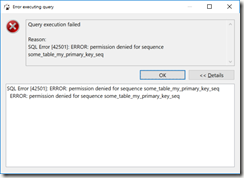
)
Summary
In SQL SERVER, there’s the IDENTITY field property.
In POSTGRES, use SERIAL, and grant USAGE, and SELECT on the associated sequence.
Bonus tip
It may be easier to grant all privileges in a schema to the user.
grant all privileges on all sequences in schema public to some_user;
Script
--connect to postgres as user2 --reconnect to postgres as user1 set role user2; grant usage, select on public.some_table_my_primary_key_seq to user2; drop table public.some_table; --can only drop the table as the owner user1 |
Monday, 17 November 2014
T-SQL Logical Query Processing Phases
This section is lifted/quoting "Inside Microsoft SQL SERVER 2005: T-SQL Querying"
Logical Query Processing Phases
This section introduces the phases involved in the logical processing of a query.
I will first briefly describe each step.
Then, in the following sections, I’ll describe the steps in much more detail and apply them to a sample query.
You can use this section as a quick reference whenever you need to recall the order and general meaning of the different phases.
Listing 1-1 contains a general form of a query, along with step numbers assigned according to the order in which the different clauses are logically processed.
Listing 1-1 Logical query processing step numbers
(8) SELECT (9) DISTINCT (11)
(1) FROM
(3)
(2) ON
(4) WHERE
(5) GROUP BY
(6) WITH {CUBE | ROLLUP}
(7) HAVING
(10) ORDER BY
In most programming languages, the code is processed in the order in which it is written.
In SQL, the first clause that is processed is the FROM clause, while the SELECT clause, which appears first, is processed almost last.
Each step generates a virtual table that is used as the input to the following step.
These virtual tables are not available to the caller (client application or outer query).
Only the table generated by the final step is returned to the caller.
If a certain clause is not specified in a query, the corresponding step is simply skipped.
Following is a brief description of the different logical steps applied in both SQL Server 2000 and SQL Server 2005.
Brief Description of Logical Query Processing Phases
Don’t worry too much if the description of the steps doesn’t seem to make much sense for now.
These are provided as a reference.
Sections that come after the scenario example will cover the steps in much more detail.
- FROM: A Cartesian product (cross join) is performed between the first two tables in the FROM clause, and as a result, virtual table VT1 is generated.
- ON: The ON filter is applied to VT1. Only rows for which the
is TRUE are inserted to VT2. - OUTER (join): If an OUTER JOIN is specified (as opposed to a CROSS JOIN or an INNER JOIN), rows from the preserved table or tables for which a match was not found are added to the rows from VT2 as outer rows, generating VT3. If more than two tables appear in the FROM clause, steps 1 through 3 are applied repeatedly between the result of the last join and the next table in the FROM clause until all tables are processed.
- WHERE: The WHERE filter is applied to VT3. Only rows for which the
is TRUE are inserted to VT4. - GROUP BY: The rows from VT4 are arranged in groups based on the column list specified in the GROUP BY clause. VT5 is generated.
- CUBE | ROLLUP: Supergroups (groups of groups) are added to the rows from VT5, generating VT6.
- HAVING: The HAVING filter is applied to VT6. Only groups for which the
is TRUE are inserted to VT7. - SELECT: The SELECT list is processed, generating VT8.
- DISTINCT: Duplicate rows are removed from VT8. VT9 is generated.
- ORDER BY: The rows from VT9 are sorted according to the column list specified in the ORDER BY clause. A cursor is generated (VC10).
- TOP: The specified number or percentage of rows is selected from the beginning of
VC10. Table VT11 is generated and returned to the caller.
Subscribe to:
Posts (Atom)