Search

Showing posts with label tsql. Show all posts

Wednesday, 16 October 2019

Talend Row_Number functionality using tMap and Sequence

This post quickly details the steps involved in mimicking the tsql’s row_number() over (partition by…) windows function, all within Talend’s TOS (Talend Open Studio).

Scenario

The starting point is the table of names below.
name
andrew
andrew
andrew
berty
berty
emily
emily
emily
edward
edward
edward
edward
hugo

We want to add a new column, which is the equivalent to the tsql
row_number() over (partition by name order by 1) as rownumber

namerownumber
andrew1
andrew2
andrew3
berty1
berty2
emily1
emily2
emily3
edward1
edward2
edward3
edward4
hugo1


Talend TOS

In Talend Open Studio, create a job with the following components:
tFixedFlowInput > tMap > tLogRow
“>” is a “Row > Main” flow.
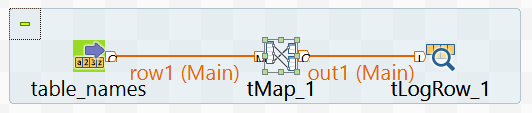
(I’ve renamed my tFixedFlowInput component to “table_names”)


tFixedFlowInput

I configure this component to
  • schema is just 1 column “name” of "String” datatype
  • use the inline content below
    andrew
    andrew
    andrew
    berty
    berty
    emily
    emily
    emily
    edward
    edward
    edward
    edward
    hugo


tMap

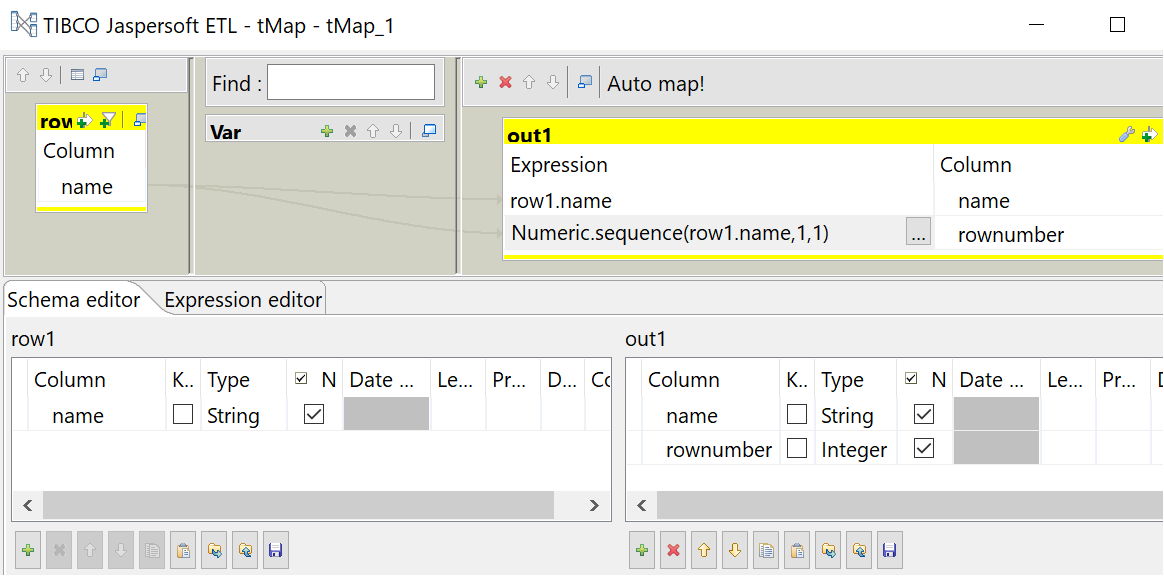
In this component I declare an output “out1” with columns
  • name, with String type
  • rownumber, with Integer type

Note that I use an expression to populate the “rownumber” column.
Numeric.sequence(row1.name,1,1)

This expression can be explained as:
  • Numeric.sequence : this defines a integer sequence
  • row1.name : this is the column that is “partition by” and “order by” when compared to the tsql windows function
  • 1 : the first “1” is the starting point for the sequence
  • 1 : the second “1” is the sequence increment


tLogRow

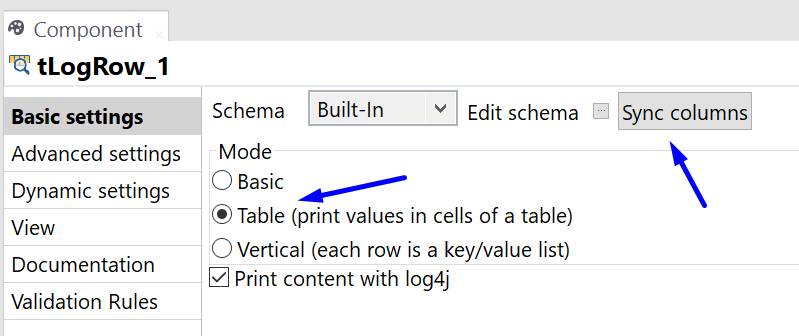
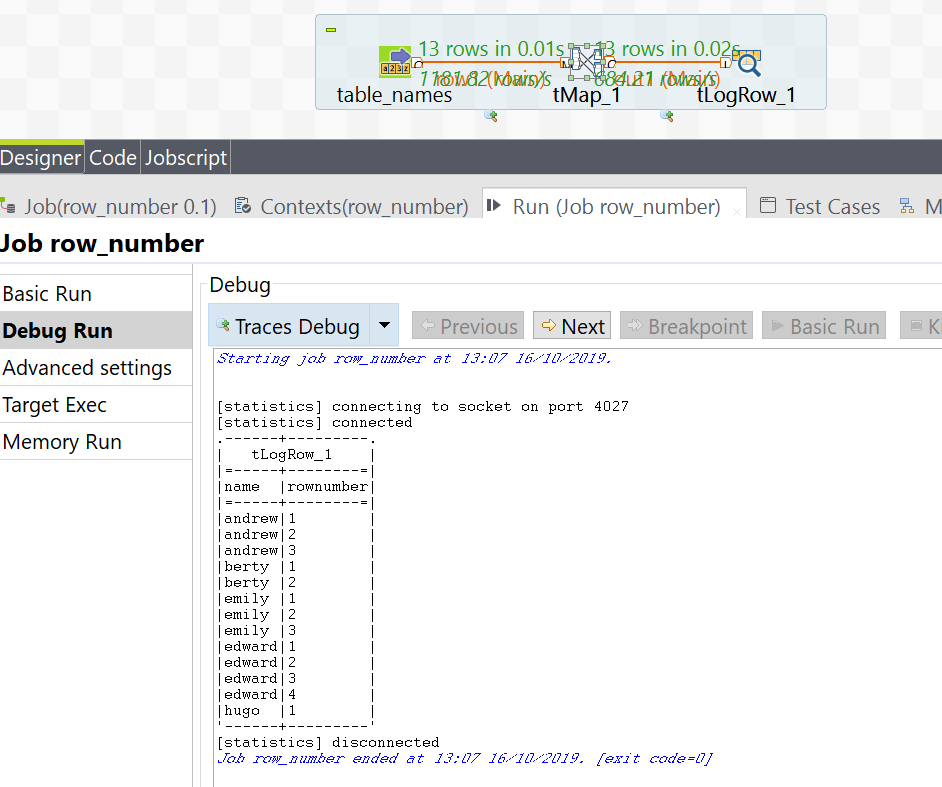
Finally, the results are returned back to the execution console for review, using the tLogRow component.

The Results

Below is a screenshot of the final execution results.
Friday, 7 June 2019

Postgres Update and Delete statements involving a join

The high-level pg-sql commands below show the syntax for updating or deleting from a postgres table.


--POSTGRES
--DML
--UPDATE
update tbl_target m
set sales = d.sales
,   status= d.status
from tbl_source d
where m.id = d.id;

--DELETE
delete from tbl_target a
using tbl_source b
where a.id = b.id;


The SQL SERVER equivalent is:

--SQL SERVER
--DML
--UPDATE

update tbl_target
set sales = b.sales
, status = b.status
from tbl_source b
where tbl_target.id = b.id;

delete tbl_target
from tbl_source b
where b.id = tbl_target.id;


Below – the setup scripts for the tables (works for both postgres and sql server)

create table tbl_target (id int, sales int, status varchar(10));
insert into tbl_target values
(1,10,'red'),
(2,20,'yellow'),
(3,30,'green');

create table tbl_source (id int, sales int, status varchar(10));
insert into tbl_source values
(3,35,'dark-green');

select * from tbl_target;
select * from tbl_source;
/*
drop table tbl_target;
drop table tbl_source;
*/

Wednesday, 21 November 2018

SQL SERVER IDENTITY vs POSTGRES SERIAL

What’s the POSTGRES equivalent of SQL SERVER’s IDENTITY column property?

SQL SERVER’s IDENTITY column property is often found when creating a table, and defining a column as int datatype (or biigint), with the IDENTITY property.

Create table dbo.some_table
(
  my_primary_key int IDENTITY as primary key
, some_field varchar(10)
);

The IDENTITY property helps auto-increment the field in SQL SERVER.

More details: MS link.


In POSTGRES, we follow a 2-step strategy.

1) Create (or alter) the table, and define the datatype as SERIAL.
Create table public.some_table
(
  my_primary_key SERIAL primary key
, some_field varchar(10)
);

In the background, POSTGRES then creates a SEQUENCE that is used for this SERIAL column
public.some_table_my_primary_key_seq

2) Grant USAGE and SELECT to the users (or roles) that will insert into the table.
The owner of the table has all privileges on the table, and the sequence.
Other users do not.
Make sure the other users (or roles) have select and insert on the table
GRANT SELECT, INSERT on public.some_table to <other_users>;

To correct this, execute the psql:
GRANT USAGE, SELECT on public.some_table_my_primary_key_seq to  <other_users>;
(replace <other_users> with the users/roles as needed)


If step (2) isn’t followed,  you are presented with an error message:

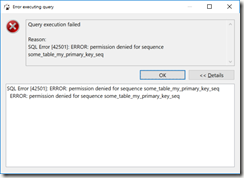
Query execution failed

Reason:
SQL Error [42501]: ERROR: permission denied for sequence some_table_my_primary_key_seq

(

in DBeaver, the error message looks like

image

)

Summary

In SQL SERVER, there’s the IDENTITY field property.

In POSTGRES, use SERIAL, and grant USAGE, and SELECT on the associated sequence.


Bonus tip

It may be easier to grant all privileges in a schema to the user.

grant all privileges on all sequences in schema public to some_user;


Script

--connect to postgres as user2
grant user2 to user1; –this is needed so that user1 can execute as user2

--reconnect to postgres as user1
select session_user, current_user, current_database();

Create table public.some_table --user1 owns this table
(
   my_primary_key SERIAL primary key
, some_field varchar(10)
);
grant select, insert on public.some_table to user2;

set role user2;
     select session_user, current_user, current_database();
     select * from public.some_table;
     insert into public.some_table (some_field) values ('hello'); --this should error
     reset role; --reset the local user to user1;
     select session_user, current_user, current_database(); --confirm that we're back as user1

grant usage, select on public.some_table_my_primary_key_seq to user2;
set role user2;
     select session_user, current_user, current_database();
     select * from public.some_table;
     insert into public.some_table (some_field) values ('hello'); --this should now pass
     reset role; --reset the local user to user1;
     select session_user, current_user, current_database(); --confirm that we're back as user1

drop table public.some_table; --can only drop the table as the owner user1

Monday, 17 November 2014

T-SQL Logical Query Processing Phases

This section is lifted/quoting "Inside Microsoft SQL SERVER 2005: T-SQL Querying"

Logical Query Processing Phases
This section introduces the phases involved in the logical processing of a query.
I will first briefly describe each step.
Then, in the following sections, I’ll describe the steps in much more detail and apply them to a sample query.
You can use this section as a quick reference whenever you need to recall the order and general meaning of the different phases.
Listing 1-1 contains a general form of a query, along with step numbers assigned according to the order in which the different clauses are logically processed.

Listing 1-1 Logical query processing step numbers
(8) SELECT (9) DISTINCT (11)
(1) FROM
(3) JOIN
(2) ON
(4) WHERE
(5) GROUP BY
(6) WITH {CUBE | ROLLUP}
(7) HAVING
(10) ORDER BY

The first noticeable aspect of SQL that is different than other programming languages is the order in which the code is processed.
In most programming languages, the code is processed in the order in which it is written.
In SQL, the first clause that is processed is the FROM clause, while the SELECT clause, which appears first, is processed almost last.

Each step generates a virtual table that is used as the input to the following step.
These virtual tables are not available to the caller (client application or outer query).
Only the table generated by the final step is returned to the caller.
If a certain clause is not specified in a query, the corresponding step is simply skipped.

Following is a brief description of the different logical steps applied in both SQL Server 2000 and SQL Server 2005.

Brief Description of Logical Query Processing Phases
Don’t worry too much if the description of the steps doesn’t seem to make much sense for now.
These are provided as a reference.

Sections that come after the scenario example will cover the steps in much more detail.

  1. FROM: A Cartesian product (cross join) is performed between the first two tables in the FROM clause, and as a result, virtual table VT1 is generated.
  2. ON: The ON filter is applied to VT1. Only rows for which the is TRUE are inserted to VT2.
  3. OUTER (join): If an OUTER JOIN is specified (as opposed to a CROSS JOIN or an INNER JOIN), rows from the preserved table or tables for which a match was not found are added to the rows from VT2 as outer rows, generating VT3. If more than two tables appear in the FROM clause, steps 1 through 3 are applied repeatedly between the result of the last join and the next table in the FROM clause until all tables are processed.
  4. WHERE: The WHERE filter is applied to VT3. Only rows for which the is TRUE are inserted to VT4.
  5. GROUP BY: The rows from VT4 are arranged in groups based on the column list specified in the GROUP BY clause. VT5 is generated.
  6. CUBE | ROLLUP: Supergroups (groups of groups) are added to the rows from VT5, generating VT6.
  7. HAVING: The HAVING filter is applied to VT6. Only groups for which the is TRUE are inserted to VT7.
  8. SELECT: The SELECT list is processed, generating VT8.
  9. DISTINCT: Duplicate rows are removed from VT8. VT9 is generated.
  10. ORDER BY: The rows from VT9 are sorted according to the column list specified in the ORDER BY clause. A cursor is generated (VC10).
  11. TOP: The specified number or percentage of rows is selected from the beginning of
    VC10. Table VT11 is generated and returned to the caller.

Thursday, 19 May 2011

SQL SERVER SET TRANSACTION ISOLATION LEVEL

Gleamed from MSDN library

SET TRANSACTION ISOLATION LEVEL

SQL Server 2000 Controls the default transaction locking behavior for all Microsoft® SQL Server™ SELECT statements issued by a connection.

Syntax
SET TRANSACTION ISOLATION LEVEL
{ READ COMMITTED
| READ UNCOMMITTED
| REPEATABLE READ
| SERIALIZABLE
}

Arguments
  • READ COMMITTED
    Specifies that shared locks are held while the data is being read to avoid dirty reads, but the data can be changed before the end of the transaction, resulting in nonrepeatable reads or phantom data. This option is the SQL Server default.

  • READ UNCOMMITTED
    Implements dirty read, or isolation level 0 locking, which means that no shared locks are issued and no exclusive locks are honored. When this option is set, it is possible to read uncommitted or dirty data; values in the data can be changed and rows can appear or disappear in the data set before the end of the transaction. This option has the same effect as setting NOLOCK on all tables in all SELECT statements in a transaction. This is the least restrictive of the four isolation levels.

  • REPEATABLE READ
    Locks are placed on all data that is used in a query, preventing other users from updating the data, but new phantom rows can be inserted into the data set by another user and are included in later reads in the current transaction. Because concurrency is lower than the default isolation level, use this option only when necessary.

  • SERIALIZABLE
    Places a range lock on the data set, preventing other users from updating or inserting rows into the data set until the transaction is complete. This is the most restrictive of the four isolation levels. Because concurrency is lower, use this option only when necessary. This option has the same effect as setting HOLDLOCK on all tables in all SELECT statements in a transaction.

    Remarks
    Only one of the options can be set at a time, and it remains set for that connection until it is explicitly changed. This becomes the default behavior unless an optimization option is specified at the table level in the FROM clause of the statement.

    The setting of SET TRANSACTION ISOLATION LEVEL is set at execute or run time and not at parse time.

    Examples
    This example sets the TRANSACTION ISOLATION LEVEL for the session. For each Transact-SQL statement that follows, SQL Server holds all of the shared locks until the end of the transaction.

    SET TRANSACTION ISOLATION LEVEL REPEATABLE READ
    GO
    BEGIN TRANSACTION
    SELECT * FROM publishers
    SELECT * FROM authors
    ...
    COMMIT TRANSACTION
  • Tuesday, 12 October 2010

    [SQL] Scripting out Jobs in SSMS

    I found that you can script out all jobs from Management Studio.
    1. Open the server in the Object Explorer.
    2. Open the "Object Explorer Details" window.
    3. In the "Object Explorer Details" window, drill down to "SQL Server Agent"
    4. Drill down to "Jobs"
    5. Select the jobs you want to script.
    6. Right click and select "Script Job as", then "Create To", and select where you want them scripted to.
    7. Remember to filter out any "SSRS" jobs. (exclude any job name that contains a hyphen).


    [SQL] Changing the collation on the MASTER database

    To change the collation on the master database, it needs to be re-created. !

    http://msdn.microsoft.com/en-us/library/dd207003.aspx
    The above link contains instructions from MSDN library (Books online - BOL)

    Monday, 11 October 2010

    [SQL] Checking MS SQL Server Stored Procedures

    External link: http://devio.wordpress.com/2009/11/26/checking-ms-sql-server-stored-procedures/

    Checking MS SQL Server Stored Procedures

    To check the validity of stored procedures, loop through the stored procedures, and enclose each execute in a transaction which is rolled back (ROLLBACK).

    See external link for full details.

    Friday, 8 October 2010

    [SSRS] Adding simple STYLES to SSRS reports.

    Adding simple STYLES to SQL SERVER REPORTING SERVICES reports.

    "We are looking at is a simple and efficient way of changing the colour of cells,
    text and lines, as well as changing the thickness and type of borders instantly
    and globally for one or more reports, using a tagged, or named style approach."


  • Step1: Add EMBEDDED CODE to a report

  • Step2: Apply Styles to the relevent report properties ("BackgroundColour" = "=code.StyleColor("Header")")

  • Step3: Think of a naming convention for the different styles you need, and use these in reports.


  • http://www.sqlservercentral.com/articles/Reporting+Services+(SSRS)/65810/