Search

Showing posts with label etl. Show all posts

Tuesday, 6 August 2019

How To – Talend TAC Update License Token

How To – Talend TAC Update License Token
This guide details how to get a new license token for TAC.
When a token is about to expire, the notification shown below is visible at the top of TAC.

To renew the token, follow the steps below.

1. On the initial TAC login screen, click on the Go to db config page link below the login button.


2. Enter the main user or administration password for TAC when prompted.


3. Next click on Validate your license manually to manually force a new verification.


4. A popup-window will appear.
Copy the long string/message in the top box of the popup-window.
Then click on the link which will open a new browser tab to https://www.talend.com/api/get_tis_validation_token_form.php


5. In this new browser tab, paste the long string/message into the form, and click on the Get your validation token button.


6. Copy the new validation token, and paste this into the bottom box of the previous popup-window mentioned in step (4).
Now click the Validate button.
If successful, then a message in green should state New validation token set.


7. The various configuration checks should all be green-ticks, in particular, the license check.


Now click on the Go to login page to return back to the initial TAC login screen and login as normal.
The notification License token will expire should not be present anymore.
If it is, give the server 5 minutes, and log back in again.
8. As a final check, the license expiry date can be confirmed via the Licenses menu.




Wednesday, 16 January 2019

Talend Open Studio – Configure Statistics and Log Capture

Within TOS (Talend Open Studio) – the project settings can be configured to allow component-level statistics and log capture.
This information can be directed to database tables for later review.
The tables are

    StatCatcher
    LogCatcher
    FlowMeterCatcher

These tables can be created by watching: https://www.youtube.com/watch?v=31EY-VhjjoA


Or by following http://diethardsteiner.blogspot.com/2012/02/talend-setting-up-database-logging-for.html

Below are the steps to configure a TOS project so that the components log stats during execution.
(it’s fairly intuitive)


Project Properties

1) Open a project, and click File>Edit Project properties


Project Settings


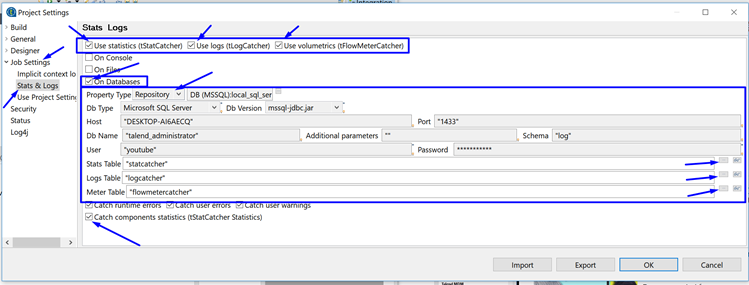
2) In the project settings window, navigate to Job Settings>Stats & Logs
3) Tick the boxes in the upper right for
    Use statistics (tStatCatcher)
    Use logs (tLogCatcher)
    Use volumetrics (tFlowMeterCatcher)
4) Tick the box for On Databases and enter the db connection details (or use the settings already stored in the project repository)
5) Finally click on the ellipse’s to help choose the correct logging table within the database.
6) Optionally, also tick the Catch components statistics (tStatCatcher Statistics).