Search

Showing posts with label talend administration center. Show all posts

Wednesday, 11 September 2019

Talend Component crib sheet

Here’s a handy reference table for the common Talend components.

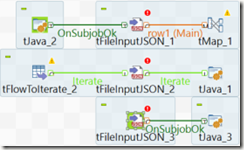
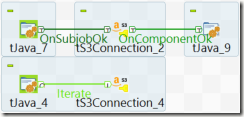
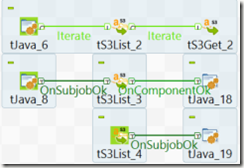
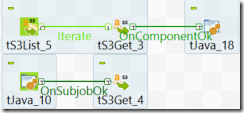
Use this document as a reference to understand what types of flows act as input and output.
InputComponentComponent DescriptionOutput
· Row.Iterate
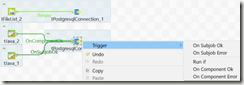
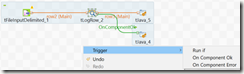
· Trigger
clip_image001tPostgressqlConnection· Trigger
· Row.Mainclip_image002tMap
map input to output columns
derive columns
perform transformations


· Row.Main
· Row.Mainclip_image003tLogRow
used as data viewer and debugging
print input data in the Run window

· Row.Main
· Trigger
· Row.Mainclip_image004tPostgresqlOutput
used to insert input data into the database
· Row.Main
· Trigger
· Row.Iterate
· Trigger
clip_image005tFileList
This outputs an iterative list of files read from a location.
The input can be from a trigger or from another row.iterate.

· Row.Main
· Trigger
· Row.Iterate
· Trigger
clip_image006tFileInputDelimited
reads data into the job so that the field attributes / schema can be further transformed
· Row.Main
· Row.Iterate
· Trigger

· Row.Iterate
· Trigger
clip_image007tFileInputJSON
reads data from a location.
presents this data / schema to the job for further transformations.

· Row.Main
· Row.Iterate
· Trigger

· Row.Mainclip_image008tFileOutputDelimited
used to write data to a file in a specified location
· Row.Main
· Trigger
· Row.Iterate
· Row.Main
· Trigger

clip_image009tJava
used to run arbitrary java code, to help with bespoke transformations.
can be used to set values to context variables, or to print messages back to the run window to help debugging the job.

· Row.Main
· Row.Iterate
· Trigger

· Row.Iterate
· Row.Main
clip_image010tExtractJSONField
used to split key:value pair data from a field / string
· Row.Main
· Row.Iterate
· Trigger

· Row.Iterateclip_image011tIterateToFlow
converts row.iterate to a row.main
· Row.Main
· Trigger
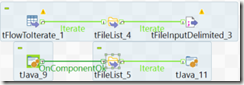
· Row.Mainclip_image012tFlowToIterate
converts row.main to a row.iterate
· Row.Iterate
· Trigger
· Row.Iterate
· Trigger
clip_image013tS3Connection
creates a connection to AWS S3
· Trigger
· Row.Iterate
· Trigger
clip_image014tS3List
used to list the objects in S3 bucket
outputs this list for iteration

· Row.Iterate
· Trigger
· Row.Iterate
· Trigger
clip_image015tS3Get
used to download the objects from s3 to a location
· Trigger
· Row.Iterate
· Trigger
clip_image016tHashOutput
used to load row.main data flow into local cache
· Row.Iterate
· Row.Main
· Trigger

· Row.Mainclip_image017tHashInput
used to retrieve data from local cache for further transformation within the job
· Row.Main
· Trigger

Tuesday, 6 August 2019

How To – Talend TAC Update License Token

How To – Talend TAC Update License Token
This guide details how to get a new license token for TAC.
When a token is about to expire, the notification shown below is visible at the top of TAC.

To renew the token, follow the steps below.

1. On the initial TAC login screen, click on the Go to db config page link below the login button.


2. Enter the main user or administration password for TAC when prompted.


3. Next click on Validate your license manually to manually force a new verification.


4. A popup-window will appear.
Copy the long string/message in the top box of the popup-window.
Then click on the link which will open a new browser tab to https://www.talend.com/api/get_tis_validation_token_form.php


5. In this new browser tab, paste the long string/message into the form, and click on the Get your validation token button.


6. Copy the new validation token, and paste this into the bottom box of the previous popup-window mentioned in step (4).
Now click the Validate button.
If successful, then a message in green should state New validation token set.


7. The various configuration checks should all be green-ticks, in particular, the license check.


Now click on the Go to login page to return back to the initial TAC login screen and login as normal.
The notification License token will expire should not be present anymore.
If it is, give the server 5 minutes, and log back in again.
8. As a final check, the license expiry date can be confirmed via the Licenses menu.


Thursday, 4 April 2019

Talend Admin Center TAC login

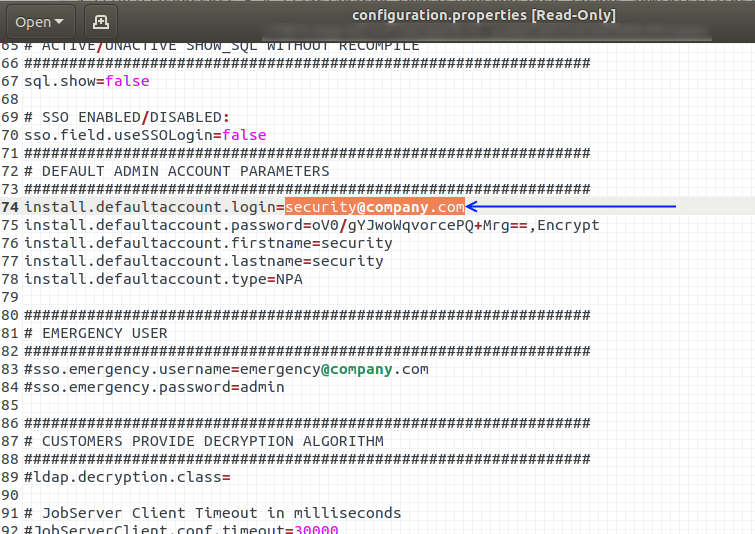
Below is the location of the configuration.properties file.
Viewing this file is very handy when locked out of the TAC gui.
The default login for TAC (after a fresh install) is
username: security@company.com
password: admin
To confirm what the default login is, it’s best to refer to the configuration.properties file on the TAC server, as detailed below.
On a local vbox installation, the Talend installation was in the local home directory.
Via a terminal session, the commands to navigate to this directory, and view the file is:
(your installation may be in a different directory, but the path should be similar.
Talend may be a different value dependant on your installation
tac may be a different value dependant on your installation)
cd ~/Talend/tac/apache-tomcat/webapps/tac/WEB-INF/classes
vi configuration.properties

Wednesday, 27 March 2019

Talend TAC Job Conductor Trigger details from database

Below is a simple query to retrieve “Job Conductor – Task – Trigger” details from the database tables associated to Talend Admin Center (TAC).

select
  et.id as executiontask_id
--,et.dtype
,et."label" as task_name
,et.idquartzjob
,t.trigger_name
,t.job_group
,tt.dtype
,tt."label" as trigger_label
,tt.description as trigger_desc
,tt.active as trigger_active
,to_timestamp(t.next_fire_time/1000) as next_fire_time
,to_timestamp(t.prev_fire_time/1000) as prev_fire_time
,to_timestamp(t.start_time/1000) as start_time
,t.start_time / 1000 as start_time_seconds
,t.start_time as start_time_unix_milliseconds
,t.trigger_state
,ct.cron_expression
,tt.listminutes
,tt.listhours
,tt.listdaysofweek
,tt.listdaysofmonth
,tt.listyears
,et.jobid
,et.idremotejob
,et.jobname
,et.generatedprojectname
,et.generatedjobname
,et.generatedjobversion
,et.generatedsvnrevision
,et.artifactgroupid
,et.artifactid
,et.runasuser
,et.status
,et.errorstatus
,et.jobversion
,et.context
,et.branch
,et.active
,et.lastscriptgenerationdate
,et.lastdeploymentdate
,et.lastrundate
,et.lastendedrundate
,et.lasttriggeringdate
,et.jobscriptarchivefilename
from executiontask et
left join qrtz_triggers t on t.job_name = et.idquartzjob::varchar
left join qrtz_cron_triggers ct on ct.trigger_name = t.trigger_name
left join talendtrigger tt on ct.trigger_name = tt.idquartztrigger::varchar
;


NOTE

Within the qrtz_cron_triggers table, the cron expression could look similar to

0 1,2,3 4,5,6 ? 4 2,3,4,5,6 2020

Note that there’s a space to help separate the difference parts of the cron expression

seconds:0 –this is always zero as the cron-scheduler within TALEND doesn’t have the functionality to set to the second.

minutes:1,2,3
hours:4,5,6
days of month:? –this means it’ll run for every day in the month
month:4 –April = 4th month in the year
days of week (1 = Sunday):2,3,4,5,6 –this is for Monday, Tuesday, Wednesday, Thursday,  Friday
year:2020


EXECUTION PLAN

When Job Tasks are set up as a sequence, or have inter-relationships (parent child), or setup as some form of hierarchy within the EXECUTION PLAN CONSOLE, then these details can be viewed using the following query:

select
  etp."label"  as parent_task_name
,et."label" as child_task_name
,case when e.executionplanpart_parent_id is null then 'Header' else '' end as Header
,e.id as executionplan_id
,e.executionplanpart_parent_id
,e.executionplan_executionplan_id
,e.executiontask_task_id
,e.status
,e.startdate
,e.enddate
--,e.*
--,et.*
FROM public.executionplanpart e
left join executiontask et on et.id = e.executiontask_task_id
left join executiontask etp on etp.id = e.executionplan_executionplan_id
order by e.executionplan_executionplan_id , e.id
;

Wednesday, 20 March 2019

Talend Job Statistics error, Connection refused, connecting to socket

https://community.talend.com/t5/Administering-and-Monitoring/resolved-Sockets-range-to-get-statistics/td-p/99764

When executing a Talend job via TAC (Talend Administration Center / the Talend Server), the following error message can be returned if the JobServer / Execution service is a remote server.
ie The JobServer or Execution service isn't on the same server as TAC.

[statistics] connecting to socket on port 10226
[statistics] connection refused

The statistics port 10226 is chosen at random by the server from a range of 10000 to 11000.
The connection is refused if this is blocked by a firewall (or security group in the case of AWS instances).
The details below help correct this.


Changing Statistics port settings

TOS (Talend Open Studio)

Window -> Preferences -> Talend -> Run/Debug and there you can change the stats port range.


TAC

For Talend Administration Center, edit the following file:
TOMCAT_FOLDER/webapps/org.talend.administrator/WEB-INF/classes/configuration.properties
Look for these lines (or add them onto the end of the file):
# The range where find a free port on the Administrator machine, where the job will send the statistics informations during its execution
scheduler.conf.statisticsRangePorts=10000-11000

And then change the scheduler.conf.statisticsRangePorts parameter for the desired range, like this:
scheduler.conf.statisticsRangePorts=10000-10010

The file should look something like this: