Search

Wednesday, 7 December 2011

Revo VAGCOM Butt Dyno dynoplot6 dynoplot4

I've jsut come across a spreadhseet created by the guys over at Ross-Tech

The spreadsheet plots theoretical horse power (hp) and torque (tq)
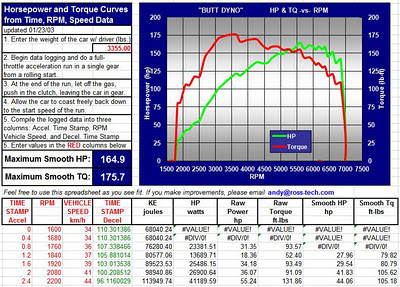


A link to their spreadsheet - often referred to as the "Butt Dyno" is:

Butt Dyno, http://www.ross-tech.net/vag-com/examples/dynoplot6.xls

Wednesday, 9 November 2011

Sensible Soccer Nostalgia - A great game from the past, not forgotten

A friend of mine mentioned a football computer game that we used to play from our younger days, Sensible Soccer on the Amiga.

The sense of nostalgia, and fond memories that even the name brings back are immense.

I can't remember playing any other football game that comes close to the balance of simplicity, intuitive controls, and un-capped levels of fun and laughter when playing against your friends when they all join in for the impromptu "world cup tournaments" that we'd host in each of our homes.

Fantastic memories !

And to top it all off - it looks like you can play it online ?!?? !



www.sensiblesoccer.de
Sensible Soccer


Sensible Soccer

Friday, 14 October 2011

Confessions of an Aca/Fan: Transmedia Storytelling 101

Confessions of an Aca/Fan: Transmedia Storytelling 101

I've just read a Henry Jenkins article, as suggested by PHONAR, discussing Transmedia.
A very interesting and insightful article, mentioning how the art of story telling and involving the reader in more than one way through different entry points in media.

It mentions Star Wars and The Matrix as fine examples of transmedia.

Excellent !!!

Tuesday, 23 August 2011

Luke Schneider Photography: Head shots: What I've Learned (A long post,but wor...

Link back to http://lukeschneiderphotography.blogspot.com/2011/07/head-shots-what-ive-learned-long.html

Head shots, while seemingly simple, can be quite difficult depending on the person being photographed.

Head shots have the power to get people very interested in what someone has to say or offer, or quickly turn someone away based on the quality of this one "simple" photograph. If you haven't seen truly amazing headshot work, do your self a favour and take a look at Peter Hurley's Portfolio.


Luke Schneider Photography: Head shots: What I've Learned (A long post,but wor...
:      

Monday, 25 July 2011

Capital cities of the world

I've been playing Google's app "Beat The Buzz", and one of the challenges is to type as fast as possible, the Capital Cities of the World.

I've googled and found via http://geographyfieldwork.com/WorldCapitalCities.htm a list of 200.


Capital City Country
Abu Dhabi United Arab Emirates
Abuja Nigeria
Accra Ghana
Addis Ababa Ethiopia
Algiers Algeria
Amman Jordan
Andorra la Vella Andorra
Ankara Turkey
Antananarivo Madagascar
Apia Samoa
Ashgabat Turkmenistan
Asmara Eritrea
Astana Kazakhstan
Asuncion Paraguay
Athens Greece
Baku Azerbaijan
Bandar Seri Begawan Brunei
Baghdad Iraq
Bamako Mali
Bangkok Thailand
Bangui Central African Republic
Banjul Gambia
Basseterre Saint Kitts and Nevis
Beijing China
Beirut Lebanon
Belgrade Serbia
Belmopan Belize
Belfast Northern Ireland
Berlin Germany
Bern Switzerland
Bishkek Kyrgyzstan
Bissau Guinea-Bissau
Bogota Colombia
Brasilia Brazil
Bratislava Slovakia
Brazzaville Congo, Republic of the
Bridgetown Barbados
Brussels Belgium
Budapest Hungary
Bucharest Romania
Buenos Aires Argentina
Bujumbura Burundi
Cairo Egypt
Canberra Australia
Caracas Venezuela
Cardiff Wales
Castries Saint Lucia
Cayenne French Guiana
Chisinau Moldova
Colombo Sri Lanka
Conakry Guinea
Copenhagen Denmark
Dakar Senegal
Damascus Syria
Dhaka Bangladesh
Dar es Salaam Tanzania
Dili East Timor
Djibouti Djibouti
Doha Qatar
Dublin Ireland
Dushanbe Tajikistan
Edinburgh Scotland
Freetown Sierra Leone
Gaborone Botswana
Georgetown Guyana
Guatemala City Guatemala
Hanoi Vietnam
Harare Zimbabwe
Havana Cuba
Helsinki Finland
Honiara Solomon Islands
Islamabad Pakistan
Jakarta Indonesia
Juba South Sudan
Kabul Afghanistan
Kathmandu Nepal
Kampala Uganda
Khartoum Sudan
Kiev Ukraine
Kigali Rwanda
Kingston Jamaica
Kingstown Saint Vincent and the Grenadines
Kinshasa Congo, Democratic Republic of the
Kuala Lumpur Malaysia
Kuwait City Kuwait
La Paz Bolivia
Libreville Gabon
Lilongwe Malawi
Lima Peru
Lisbon Portugal
Ljubljana Slovenia
Lome Togo
London England
London United Kingdom
Luanda Angola
Lusaka Zambia
Luxembourg Luxembourg
Madrid Spain
Majuro Marshall Islands
Malabo Equatorial Guinea
Male Maldives
Managua Nicaragua
Manama Bahrain
Manila Philippines
Maputo Mozambique
Maseru Lesotho
Mbabana Swaziland
Melekeok Palau
Mexico City Mexico
Minsk Belarus
Mogadishu Somalia
Monaco Monaco
Monrovia Liberia
Montevideo Uruguay
Moroni Comoros
Moscow Russia
Muscat Oman
Nairobi Kenya
Nassau Bahamas
N'Djamena Chad
New Delhi India
Niamey Niger
Nicosia Cyprus
Nouakchott Mauritania
Nuku'alofa Tonga
Ouagadougou Burkina Faso
Oslo Norway
Ottawa Canada
Palikir Federated States of Micronesia
Panama City Panama
Paramaribo Suriname
Paris France
Phnom Penh Cambodia
Podgorica Montenegro
Port au Prince Haiti
Port Louis Mauritius
Port Moresby Papua New Guinea
Port of Spain Trinidad and Tobago
Port Vila Vanuatu
Porto Novo Benin
Prague Czech Republic
Praia Cape Verde
Pretoria South Africa
Pristina Kosovo
Pyongyang North Korea
Quito Ecuador
Rabat Morocco
Rangoon (Yangon) Myanmar (Burma)
Reykjavik Iceland
Riga Latvia
Riyadh Saudi Arabia
Rome Italy
Roseau Dominica
Saint George's Grenada
Saint John's Antigua and Barbuda
San Jose Costa Rica
San Marino San Marino
San Salvador El Salvador
Sanaa Yemen
Santiago Chile
Santo Domingo Dominican Republic
Sao Tome Sao Tome and Principe
Sarajevo Bosnia and Herzegovina
Seoul South Korea
Singapore Singapore
Skopje Macedonia
Sofia Bulgaria
Stockholm Sweden
Suva Fiji
Taipei Taiwan
Tallinn Estonia
Tarawa Atoll Kiribati
Tashkent Uzbekistan
Tbilisi Georgia
Tegucigalpa Honduras
Tehran Iran
Tel Aviv Israel
Amsterdam Netherlands
Thimphu Bhutan
Tirane Albania
Tokyo Japan
Tripoli Libya
Tunis Tunisia
Ulaanbaatar Mongolia
Vaduz Liechtenstein
Vaiaku village Tuvalu
Valletta Malta
Vatican City Vatican City
Victoria Seychelles
Vienna Austria
Vientiane Laos
Vilnius Lithuania
Warsaw Poland
Washington D.C. United States
Wellington New Zealand
Windhoek Namibia
Yamoussoukro Cote d'Ivoire
Yaounde Cameroon
Yerevan Armenia
No official capital Nauru
Zagreb Croatia

To type out a few cities the quickest, it's probably best to type cities with the fewest number of letters...

Capital City Country
ApiaSamoa
BakuAzerbaijan
BernSwitzerland
DiliEast Timor
DohaQatar
JubaSouth Sudan
KievUkraine
LimaPeru
LomeTogo
MaleMaldives

Thursday, 16 June 2011

SSRS Date format expressions

Information gleamed from http://www.sqlservercentral.com/Forums/Topic290724-150-3.aspx

The Format function is locale aware and can be used as follows [not the case senstivity]
Set Language=User!language in the Report properties and use the Format function with the following codes:

Standard Format Specifiers for Dates and Times:
The table below shows the standard date and time formatters.
d Short Date
D Long date
f long date & short time
F long date and long time
g short date and short time
G short date and long time
M or m month and day
Y or y year and month
t short time
T long time
s displays in ISO 8601 format using local time
u displays in ISO 8601 format using universal time
U date and time in unversal time
R or r displays in RFC 1123 format

Custom formatting sequences:
There are also specific character sequences that can be used to achieve custom formatting of dates and times.

Format Description
d day of month (1 or 2 digits as required)
dd day of month (always 2 digits, with a leading 0 if needed)
ddd day of week (3 letter abbreviation)
dddd day of week (full name)
M month number (1 or 2 digits as required)
MM month number (always 2 digits, with a leading 0 if needed)
MMM month name (3 letter abbreviation)
MMMM month name (full name)
y year ( last 1 or 2 digits, no leading 0)
yy year (last 2 digits)
yyyy year (4 digits)
H hour in 24-hour format (1 or 2 digits as required)
HH hour in 24-hour format (always 2 digits, with a leading 0 if needed)
h hour in 12-hour format (1 or 2 digits as required)
hh hour in 12 hour format
m minutes (1 or 2 digits as required)
mm minutes (always 2 digits, with a leading 0 if needed)
s seconds (1 or 2 digits as required)
ss seconds
t first character in the am/pm designator
tt am/pm designator
z time zone offset, hour only (1 or 2 digits as required)
zz time zone offset, hour only (always 2 digits, with a leading 0 if needed)
zzz time zone offset, hour and minute
/ default date separator
: default time separator
\ escape characters

Tuesday, 14 June 2011

SSIS : connection to ssis service failed. access denied

SSIS : connection to ssis service failed. access denied


http://www.sqlservercentral.com/Forums/Topic311706-146-1.aspx

A few things to check:

If you have a firewall between the developer and the sql server:

  • open a port for SSIS on the firewall (3882 and an additional port for the return traffic)
  • switch from using a dynamic return port to a static port:

    1. hkey_classes_root\appid\{F38B7F09-979B-4241-80D9-2EADED02954F}
    2. new reg_mutlistring
    3. Key=Endpoints
    4. Value=ncacn_ip_tcp,0,port#

      (port# is the port you have open on your firewall for SSIS)

    Check MsDtsServer in Component Services:

    1. add all permissions for msdtsserver for the developer account
    2. component services > My computer properties > MSDTC > Security Configuration > Network DTC Access > Allow Remote clients
    3. COM Security > Access permissions > Edit Limits
    4. add all permissions for msdtsserver for the developer account
    5. COM Security > Launch and activation permissions > Edit Limits
    6. add all permissions for msdtsserver for the developer account
    7. Allow inbound
    8. allow outbound
    9. restart MSDTC
    10. restart SSIS
    If this does not fix the problem, make sure you have build 2153:
    select @@version
    Microsoft SQL Server 2005 - 9.00.2153.00

    If you do not have that build, apply SP1 and then the post SP1 rollup in the correct order (apply all six patches in the order listed in the aticle below):

    SP1 - http://www.microsoft.com/downloads/details.aspx?FamilyID=cb6c71ea-d649-47ff-9176-e7cac58fd4bc&DisplayLang=en
    rollup - http://support.microsoft.com/Default.aspx?id=918222

    If you still can't connect to SSIS, you need to check other things like DNS and account permissions.

    Or - as per the forum thread, try
    "The user's Windows account needed to be in the Distributed COM Users group on the server."
  • Thursday, 2 June 2011

    SQL Setting Up Windows Service Accounts

    Setting Up Windows Service Accounts


    http://msdn.microsoft.com/en-us/library/ms143504.aspx

    Each service in SQL Server represents a process or a set of processes to manage authentication of SQL Server operations with Windows. This topic describes the default configuration of services in this release of SQL Server, and configuration options for SQL Server services that you can set during SQL Server installation.

    Depending on the components that you decide to install, SQL Server Setup installs the following services:

  • SQL Server Database Services - The service for the SQL Server relational Database Engine.

  • SQL Server Agent - Executes jobs, monitors SQL Server, fires alerts, and enables automation of some administrative tasks.

    Note
    For SQL Server and SQL Server Agent to run as services in Windows, SQL Server and SQL Server Agent must be assigned a Windows user account. For more information about how to customize account information for each service, see How to: Install SQL Server 2008 R2 (Setup).


  • Analysis Services - Provides online analytical processing (OLAP) and data mining functionality for business intelligence applications.

  • Reporting Services - Manages, executes, creates, schedules, and delivers reports.

    Integration Services - Provides management support for Integration Services package storage and execution.

    SQL Server Browser - The name resolution service that provides SQL Server connection information for client computers.

    Full-text search - Quickly creates full-text indexes on content and properties of structured and semistructured data to provide document filtering and word-breaking for SQL Server.

    SQL Server Active Directory Helper - Publishes and manages SQL Server services in Active Directory.

    SQL Writer - Allows backup and restore applications to operate in the Volume Shadow Copy Service (VSS) framework.

    Important
    Always use SQL Server tools such as SQL Server Configuration Manager to change the account used by the SQL Server or SQL Server Agent services, or to change the password for the account. In addition to changing the account name, SQL Server Configuration Manager performs additional configuration such as setting permissions in the Windows Registry so that the new account can read the SQL Server settings. Other tools such as the Windows Services Control Manager can change the account name but do not change associated settings. If the service cannot access the SQL Server portion of the registry, the service may not start properly.

    Important
    For Analysis Services instances that you deploy in a SharePoint farm, always use SharePoint Central Administration to change the server accounts for PowerPivot service applications and the Analysis Services service. Associated settings and permissions are updated to use the new account information when you use Central Administration.

    http://msdn.microsoft.com/en-us/library/ms143504.aspx
  • Wednesday, 25 May 2011

    How to Share Data Between Stored Procedures


    How to Share Data Between Stored Procedures
    http://www.sommarskog.se/share_data.html


  • Using OUTPUT Parameters
  • Table-valued User-defined Functions
  • Using a Table
  • Insert-Exec
  • Table Parameters, and Table Types
  • Using the CLR
  • OPENQUERY
  • Using XML
  • Using Cursor Variables

    A must read.
  • SELECT @@spid

    SELECT @@spid
    

    Using @@SPID to return the SessionID of the T-SQL session that the statements are currently in.

    HTML PRE Tag

    Definition and Usage


    The PRE tag defines preformatted text.

    Text in a PRE element is displayed in a fixed-width font (usually Courier), and it preserves both spaces and line breaks.

    Monday, 23 May 2011

    Using CROSS APPLY (t-sql)

    Using CROSS APPLY (t-sql)
    Given:

    CREATE FUNCTION dbo.fn_GetTopOrders(@custid AS int, @n AS INT)
    RETURNS TABLE
    AS
    RETURN
    SELECT TOP(@n) *
    FROM Sales.SalesOrderHeader
    WHERE CustomerID = @custid
    ORDER BY TotalDue DESC
    GO

    which returns the top n orders per customerID


    SELECT C.CustomerID,
    O.SalesOrderID,
    O.TotalDue
    FROM
    AdventureWorks.Sales.Customer AS C
    CROSS APPLY
    AdventureWorks.dbo.fn_GetTopOrders(C.CustomerID, 3) AS O
    ORDER BY
    CustomerID ASC, TotalDue DESC


    results in this...


    CustomerID SalesOrderID TotalDue
    ----------- ------------ ---------------------
    1 45283 37643.1378
    1 46042 34722.9906
    1 44501 26128.8674
    2 46976 10184.0774
    2 47997 5469.5941
    2 57044 4537.8484
    3 53616 92196.9738
    3 47439 78578.9054
    3 48378 56574.3871
    4 47658 132199.8023
    . . .


    The APPLY clause acts like a JOIN without the ON clause comes in two flavors: CROSS and OUTER.
    The OUTER APPLY clause returns all the rows on the left side (Customers)
    whether they return any rows in the table-valued-function or not (the "LEFT JOIN" table).

    The columns that the table-valued-function returns are null if no rows are returned.

    The CROSS APPLY only returns rows from the left side (Customers)
    if the table-valued-function returns rows.

    Notice that I'm just passing in the CustomerID to the function.
    It returns the TOP 3 rows based on the amount of the order.

    Since I'm using CROSS APPLY a customer without orders won't appear in the list.
    I can also pass in a number other than 3 to easily return a different number of orders per customer.

    Even better I can pass in a different number of orders for each customer.
    So I could list the top 5 orders for one type of customer but the top 10 for another type of customer.

    How cool is that?!?

    And it gets even better.
    Remember the function has an ORDER BY in it.
    It will always return the top orders based on the amount.
    However you can change the ORDER BY clause in the query that calls the function to display those rows in whatever order you want.
    You could easily display the top 3 orders in ascending order instead.

    [SQL] @@Identity, SCOPE_IDENTITY

    [SQL] @@Identity, SCOPE_IDENTITY()
    msdn link


    SCOPE_IDENTITY, IDENT_CURRENT, and @@IDENTITY are similar functions because they return values that are inserted into identity columns.

    IDENT_CURRENT is not limited by scope and session; it is limited to a specified table. IDENT_CURRENT returns the value generated for a specific table in any session and any scope. For more information, see IDENT_CURRENT (Transact-SQL).

    SCOPE_IDENTITY and @@IDENTITY return the last identity values that are generated in any table in the current session. However, SCOPE_IDENTITY returns values inserted only within the current scope; @@IDENTITY is not limited to a specific scope.

    For example, there are two tables, T1 and T2, and an INSERT trigger is defined on T1. When a row is inserted to T1, the trigger fires and inserts a row in T2. This scenario illustrates two scopes: the insert on T1, and the insert on T2 by the trigger.

    Assuming that both T1 and T2 have identity columns, @@IDENTITY and SCOPE_IDENTITY will return different values at the end of an INSERT statement on T1. @@IDENTITY will return the last identity column value inserted across any scope in the current session. This is the value inserted in T2. SCOPE_IDENTITY() will return the IDENTITY value inserted in T1. This was the last insert that occurred in the same scope. The SCOPE_IDENTITY() function will return the null value if the function is invoked before any INSERT statements into an identity column occur in the scope.

    Failed statements and transactions can change the current identity for a table and create gaps in the identity column values. The identity value is never rolled back even though the transaction that tried to insert the value into the table is not committed. For example, if an INSERT statement fails because of an IGNORE_DUP_KEY violation, the current identity value for the table is still incremented.

    Thursday, 19 May 2011

    SQL Server Logins and Users

    Gleamed from akadia.com

    SQL Server Logins and Users
    Overview
    Although the terms login and user are often used interchangeably, they are very different.
  • A login is used for user authentication
  • A database user account is used for database access and permissions validation.

    Logins are associated to users by the security identifier (SID).
    A login is required for access to the SQL Server server. The process of verifying that a particular login is valid is called "authentication". This login must be associated to a SQL Server database user. You use the user account to control activities performed in the database. If no user account exists in a database for a specific login, the user that is using that login cannot access the database even though the user may be able to connect to SQL Server. The single exception to this situation is when the database contains the "guest" user account. A login that does not have an associated user account is mapped to the guest user. Conversely, if a database user exists but there is no login associated, the user is not able to log into SQL Server server.


    When a database is restored to a different server it contains a set of users and permissions but there may not be any corresponding logins or the logins may not be associated with the same users. This condition is known as having "orphaned users."

    Troubleshooting Orphaned Users
    When you restore a database backup to another server, you may experience a problem with orphaned users. The following scenario illustrates the problem and shows how to resolve it.
    Use master
    sp_addlogin 'test', 'password', 'Northwind'

    SELECT sid FROM dbo.sysxlogins WHERE name = 'test'

    0xE5EFF2DB1688C246855B013148882E75
    Grant access to the user you just created
    Use Northwind
    sp_grantdbaccess 'test'
    SELECT sid FROM dbo.sysusers WHERE name = 'test'

    0xE5EFF2DB1688C246855B013148882E75

    As you can see, both SID's are identical.

    Backup the database
    Use master
    BACKUP DATABASE Northwind
    TO DISK = 'C:\Northwind.bak'

    Copy the Backupfile to another Maschine and SQL Server and restore it as follows:
    RESTORE FILELISTONLY
    FROM DISK = 'C:\Users\Zahn\Work\Northwind.bak'

    Northwind
    Northwind_log


    RESTORE DATABASE TestDB
    FROM DISK = 'C:\Users\Zahn\Work\Northwind.bak'
    WITH
     MOVE 'Northwind' TO 'D:\DataMSSQL\Data\northwnd.mdf',
     MOVE 'Northwind_log' TO 'D:\DataMSSQL\Data\northwnd.ldf'

    The restored database contains a user named "test" without a corresponding login, which results in "test" being orphaned.

    Check the SID's
    Use master
    SELECT sid FROM dbo.sysxlogins WHERE name = 'test'

    0x39EE98D37EAC2243B7833705EC1C60E3

    Use TestDB
    SELECT sid FROM dbo.sysusers WHERE name ='test'

    0xE5EFF2DB1688C246855B013148882E75

    Now, to detect orphaned users, run this code
    Use TestDB
    sp_change_users_login 'report'

    test 0xE5EFF2DB1688C246855B013148882E75

    The output lists all the logins, which have a mismatch between the entries in the sysusers system table, of the TestDB database, and the sysxlogins system table in the master database.

    Resolve Orphaned Users

    Use TestDB
    sp_change_users_login 'update_one', 'test', 'test'


    SELECT sid FROM dbo.sysusers WHERE name = 'test'
    0x39EE98D37EAC2243B7833705EC1C60E3

    use master
    SELECT sid FROM dbo.sysxlogins WHERE name ='test'

    0x39EE98D37EAC2243B7833705EC1C60E3

    This relinks the server login "test" with the the TestDB database user "test".
    The sp_change_users_login stored procedure can also perform an update of all orphaned users with the "auto_fix" parameter but this is not recommended because SQL Server attempts to match logins and users by name.
    For most cases this works; however, if the wrong login is associated with a user, a user may have incorrect permissions.
  • SQL SERVER SET TRANSACTION ISOLATION LEVEL

    Gleamed from MSDN library

    SET TRANSACTION ISOLATION LEVEL

    SQL Server 2000 Controls the default transaction locking behavior for all Microsoft® SQL Server™ SELECT statements issued by a connection.

    Syntax
    SET TRANSACTION ISOLATION LEVEL
    { READ COMMITTED
    | READ UNCOMMITTED
    | REPEATABLE READ
    | SERIALIZABLE
    }

    Arguments
  • READ COMMITTED
    Specifies that shared locks are held while the data is being read to avoid dirty reads, but the data can be changed before the end of the transaction, resulting in nonrepeatable reads or phantom data. This option is the SQL Server default.

  • READ UNCOMMITTED
    Implements dirty read, or isolation level 0 locking, which means that no shared locks are issued and no exclusive locks are honored. When this option is set, it is possible to read uncommitted or dirty data; values in the data can be changed and rows can appear or disappear in the data set before the end of the transaction. This option has the same effect as setting NOLOCK on all tables in all SELECT statements in a transaction. This is the least restrictive of the four isolation levels.

  • REPEATABLE READ
    Locks are placed on all data that is used in a query, preventing other users from updating the data, but new phantom rows can be inserted into the data set by another user and are included in later reads in the current transaction. Because concurrency is lower than the default isolation level, use this option only when necessary.

  • SERIALIZABLE
    Places a range lock on the data set, preventing other users from updating or inserting rows into the data set until the transaction is complete. This is the most restrictive of the four isolation levels. Because concurrency is lower, use this option only when necessary. This option has the same effect as setting HOLDLOCK on all tables in all SELECT statements in a transaction.

    Remarks
    Only one of the options can be set at a time, and it remains set for that connection until it is explicitly changed. This becomes the default behavior unless an optimization option is specified at the table level in the FROM clause of the statement.

    The setting of SET TRANSACTION ISOLATION LEVEL is set at execute or run time and not at parse time.

    Examples
    This example sets the TRANSACTION ISOLATION LEVEL for the session. For each Transact-SQL statement that follows, SQL Server holds all of the shared locks until the end of the transaction.

    SET TRANSACTION ISOLATION LEVEL REPEATABLE READ
    GO
    BEGIN TRANSACTION
    SELECT * FROM publishers
    SELECT * FROM authors
    ...
    COMMIT TRANSACTION
  • Tuesday, 26 April 2011

    How to Create a Custom Windows Installation DVD or USB Install

    Article lifted from LifeHacker.


    http://lifehacker.com/?utm_source=Lifehacker+Newsletter&utm_campaign=c3be0c41d7-UA-142218-1&utm_medium=email#!5793427/how-to-create-a-custom-windows-installation-dvd-or-usb-install


  • rt7lite

    If you're looking to integrate Windows 7's Service Pack into your disc, you'll want to scroll down to the beta releases. That service pack includes all the patches, security fixes, and other updates from its first year and a half of existence, so I'd recommend snagging the beta. Download the appropriate 32-bit or 64-bit dowload for your system (the system you're working on, not the Windows disc you intend to create), install RT7Lite, and launch it.

    The beta release for RT7Lite that includes Windows 7 with SP1 is :
    Download RT Se7en Lite - Beta (build 2.6.0) for windows 7, windows Vista x64 now!
    http://www.pub.rt7lite.com/7lite-rc-beta-1726-dec6-10-stable/rt_7_lite_win7_Vista_x64_sp1.exe


  • http://sourceforge.net/projects/unetbootin/files/UNetbootin/Custom/unetbootin-eeeubuntu-windows-276.exe/download

    http://www.tomshardware.co.uk/forum/243423-14-image-flash

    UPDATE - still having issues with usb installation - resorting to:

    http://www.intowindows.com/how-to-install-windows-7vista-from-usb-drive-detailed-100-working-guide/


    xcopy c:\ d:\ /h/i/c/k/e/r/y

  • Friday, 22 April 2011

    Reset SERVICE indicator on VAG cars

    From my SKODA service Manual

    Models with FIXED SERVICE INTERVALS (QG0)

    1. Switch off the ignition, press the reset button of the trip counter for distance driven, and hold it down.
      Switching the ignition on causes a service interval to appear on the display.
    2. Holding the reset button down for 10 seconds will cause the counter to be reset (the display shows "---" and then the trip counter readout).

      The readout "OIL" will appear in the display after resetting the indicator "INSP", and releasing the reset button when both service intervals (INSP and OIL) were reached together.

    3. Repress the reset button and hold it down for 10 seconds to also reset this interval


    Models with EXTENDED SERVICE INTERVALS (QG1 and QG2)

    1. Switch off the ignition, press the reset button of the trip counter for "distance driven" and hold it down.
    2. Switch the ignition ON, and release the reset button.
    3. Now turn the reset button to the RIGHT.


      All counters will be reset to 0.

    Tuesday, 19 April 2011

    Car – check your engine oil via Castrol.com

    Castol's "What's the right oil for my car?"

    The CASTROL.COM website, has a handy function that lets you check what specification oil is ideal or recommended for your motor.


    My Skoda Fabia vRS needs the following VW PD 505.01 or higher CASTROL oil specification (Castol EDGE)


    The various Castrol Magnatec oil range details can be found here.