
|
Monday, 26 November 2018
Skoda Fabia (mk1) Fuse Layout


Wednesday, 21 November 2018
SQL SERVER IDENTITY vs POSTGRES SERIAL
What’s the POSTGRES equivalent of SQL SERVER’s IDENTITY column property?
SQL SERVER’s IDENTITY column property is often found when creating a table, and defining a column as int datatype (or biigint), with the IDENTITY property.
Create table dbo.some_table
(
my_primary_key int IDENTITY as primary key
, some_field varchar(10)
);The IDENTITY property helps auto-increment the field in SQL SERVER.
More details: MS link.
In POSTGRES, we follow a 2-step strategy.
1) Create (or alter) the table, and define the datatype as SERIAL.
Create table public.some_table
(
my_primary_key SERIAL primary key
, some_field varchar(10)
);
In the background, POSTGRES then creates a SEQUENCE that is used for this SERIAL column
public.some_table_my_primary_key_seq
2) Grant USAGE and SELECT to the users (or roles) that will insert into the table.
The owner of the table has all privileges on the table, and the sequence.
Other users do not.
Make sure the other users (or roles) have select and insert on the table
GRANT SELECT, INSERT on public.some_table to <other_users>;
To correct this, execute the psql:
GRANT USAGE, SELECT on public.some_table_my_primary_key_seq to <other_users>;
(replace <other_users> with the users/roles as needed)
If step (2) isn’t followed, you are presented with an error message:
Query execution failed
Reason:
SQL Error [42501]: ERROR: permission denied for sequence some_table_my_primary_key_seq
(
in DBeaver, the error message looks like
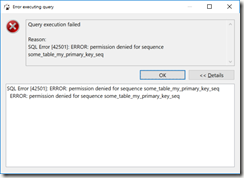
)
Summary
In SQL SERVER, there’s the IDENTITY field property.
In POSTGRES, use SERIAL, and grant USAGE, and SELECT on the associated sequence.
Bonus tip
It may be easier to grant all privileges in a schema to the user.
grant all privileges on all sequences in schema public to some_user;
Script
--connect to postgres as user2 --reconnect to postgres as user1 set role user2; grant usage, select on public.some_table_my_primary_key_seq to user2; drop table public.some_table; --can only drop the table as the owner user1 |
Saturday, 20 October 2018
20181020 How to remove the gear knob insert Skoda Octavia VAG
The chrome insert on the gear knob has started to flake - the video shows how to remove the insert so that it can be replaced or fixed.
Sunday, 18 June 2017
Skoda Octavia mk2 EGR cleaning instructions
Details below from Briskoda.
https://www.briskoda.net/forums/topic/212548-egr-valve-cleaning/?do=findComment&comment=2971325
The 2.0 PD is probably easier as it's at the front of the engine.
You'll need a 6mm and a 5mm allen key and if you've got a set of allen keys on sockets, then that with a ratchet helps.
You'll also need a fairly wide flat headed screwdriver to allow you to pop the clip open on the bottom hose of the EGR/Anti-Shudder valve.
Finally some carb cleaner, a couple of pairs of rubber gloves (disposable), a fair amount of kitchen roll and some old newspaper.
A few cocktail sticks and an old toothbrush prove to be helpful too.
1) unplug the electrical connector and carefully place it out of harms way.
2) Use the screwdriver to slide it behind the spring clip on the large lower hose connection and pull to open the spring lock.
Once this is open (Taking care not to damage anything) then you can slide the hose out of the bottom and clean up any oil that leaks out.
3) Using the 5mm allen key, undo the long bolt at the rear (slightly left) of the EGR/Flap body.
4) Undo the two 6mm allen bolts attaching the EGR feed pipe on the body and put these in a safe place.
5) Undo the two short bolts that hold the top of the EGR to the inlet manifold.
Don't bother separating the EGR and flap as it's probably not needed.
6) Remove the section, and clean it all out carefully, making sure you don't damage anything and don't try and force the flap.
The flap won't move, so don't try as doing so will break it.
7) Refit everything in reverse, using new gaskets if required and a small amount of threadlock on each of the removed bolts.
Spend ages cleaning your fingers even though you had gloved on.

Friday, 14 April 2017
Flapjack recipe
6oz butter or margarine
3oz demerara sugar
3 tablespoons of syrup (use plenty)
8oz quick cook rolled oats
Pinch of salt
Melt the fat in a saucepan, over a gentle heat.
Mix in sugar and syrup.
Mix in oats and salt.
Stir well and put into a greased tin and press down.
Bake for 30 - 35 minutes in the centre of the oven at 375°F (this might be abit too hot).
When cooked, leave to stand for a few minutes, then cut across into squares.
Leave in tin until cold.

Tuesday, 14 March 2017
TED Talk - 10 ways to have a better conversation
Celeste Headlee
1) don't multi-task - be present | in that conversation moment | don't be half-in the conversation
2) don't pontificate - enter every conversation assume that you have something to learn | everyone you will every meet knows something you don't | always be prepared to be amazed.
3) use open-ended questions
who
what
where
when
why
how
what was that like | how does that feel
4) go with the flow (let thoughts enter your mind, and let them go again)
5) if you don't know - say that you don't know | err on the side of cautioni
6) don't equate personal experience with their's | it's not a competition | it's not the same | all experiences are individual | it's not about you
7) try not to repeat yourself
8) stay out of the weeds - people don't care about names / dates / detials | people care about you, what you like, what you have in-common
9) listen - listening is the most important skill - if your mouth is open, you're not learning | no man ever listened his way out of a job
10) be brief - be a mini-skirt - short | to the point - summaries | be interesting, be long-enough to cover the subject.
Saturday, 18 February 2017
ZappySys SSIS Tasks - Importing data from SQL SERVER into Redshift
- Using SSIS (SQL SERVER INTEGRATION SERVICES) to read data from SQL SERVER, and create flatfiles.
- Using AWS CLI, push this data into an S3 bucket.
- Within Redshift - issue the COPY command, to pull the data from S3 into a Redshift table
- Optionally, issue another S3 command and move the files into an "Archive" folder - for better house keeping.

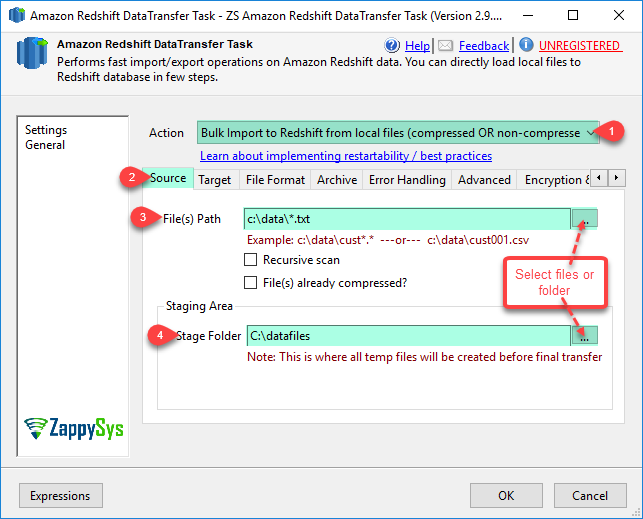
Zappy even have recorded a straight-forward video on how to use this task to speed up the implementation.
Here's some more details (from http://zappysys.com/ to help summaries what they have to offer)
Why SSIS PowerPack?
- Coding free, drag and drop high performance suite of Custom SSIS Components and SSIS Tasks
- Used by many companies around the globe
- Compatible with SQL Server 2005,2008, 2008 R2, 2012, 2014 and 2016
- Support for 32bit and 64bit Server/Desktop OS
- Easy to use, Familiar looks and feel and fully integrated in BIDS/SSDT
- No license needed if you are developing/testing in BIDS/SSDT
- Rapid update cycle and prompt support (See what’s new). We will help you over phone, web meetings and via email.
- 30 days money back guarantee if not satisfied for whatever reason.
SSIS Integration Packs
- Web API Integration (REST / SOAP)
- JSON Integration
- XML Integration
- MongoDB Integration
- Amazon Redshift Integration
- Amazon DynamoDB Integration
- Salesforce Integration
SSIS Tasks\Components by Category
Monday, 26 December 2016
VAG DPF Diesel particulate filter
http://www.seatcupra.net/forums/showthread.php?t=263734
VAG DIESEL PARTICULATE FILTERS
Courtesy of David Bodily Volkswagen Technical Support Specialist
Diesel Particulate Filter (DPF)
Detailed below is important information outlining the function and features of the Diesel Particulate filter which all members of your team need to be aware of.
Diesel particulate filters are becoming more commonplace on diesel engines, particularly sizes 2.0L upwards. This is in order to reduce the exhaust emissions as required by European legislation.
The prime reason for a DPF is to reduce particulate matter entering the atmosphere. Particulate matter is found in the form of soot, which is produced during diesel combustion. The DPF traps most of the soot which would normally travel down the exhaust and into the atmosphere. The DPF can hold a certain amount of soot, but not a huge quantity and therefore it needs to go through a process called ‘regeneration’ in order to clear the soot loading. When the soot goes through a ‘regeneration’ process it will be converted to a much smaller amount of ash. The ash is non-removable. There are two types of ‘regeneration’, passive and active.
During long motorway journeys, passive regeneration will occur. This needs no intervention from the engine control unit. Due to the raised exhaust temperatures on a long journey (temperatures between 350 and 500°C), the procedure occurs slowly and continuously across the catalytic-coated (with platinum) DPF. The catalytic-coated DPF is situated close to the Engine, therefore the exhaust gas temperature is high enough (500°C) to ignite the soot particles. Due to this soot is burned-off and is converted into a smaller amount of ash.
Active ‘regeneration’ is when the ECU intervenes when the soot loading in the DPF is calculated to be 45%. The procedure lasts for about 5 – 10 minutes. Specific measures are taken by the ECU to raise the engine exhaust temperature to above 600°C, these include switching off the exhaust gas recirculation and increasing the fuel injection period to include a small injection after the main injection. The soot particles are oxidised at this temperature.
The ECU will trigger a regeneration process, if for some reason this is aborted, ie. customer slows down, stops etc, the process will be resumed when regeneration conditions are once again met, above 60km/h (38mph). This will continue for 15 minutes.
If after 2 attempts of 15 minutes, a successful regeneration has not been possible, the loading will increase. At 50% soot loading, the ECU will continue to maintain maximum exhaust temperatures of 600°C to 650°C to cause a regeneration process. The system will try to run a regeneration process for 15 minutes. If unsuccessful, the system will repeat this process for a further 15 minutes, if still unsuccessful, the DPF light on the driver display panel will then be lit.
The owners handbook states, the DPF symbol lights up to indicate that the diesel particulate filter has become obstructed with soot due to frequent short trips. When the warning lamp comes on, the driver should drive at a constant speed of at least 60 km/h for about 10 minutes. As a result of the increase in temperature the soot in the filter will be burned off. If the DPF symbol does not go out, the driver should contact an authorised Volkswagen repairer and have the fault rectified.
At 55% soot loading the DPF light is lit on driver display panel. At this point the customer should follow the advice in the handbook. If they ignore this information and continue driving the vehicle until the soot loading reaches 75% without successful regeneration, additional warning lamps will light up. At this point the customer will also be complaining of lack of power, etc.
At 75%, regeneration is still possible with the use of the VAS tester. Only when the loading is above 95%, is it necessary to replace the DPF unit.
Operating Status System Response
45% DPF Load Level 1
Normal Regeneration
50% DPF Load Level 2
Regeneration at maximum exhaust temperatures
55% DPF Load DPF lamp
Regeneration from 60 km/h onwards
("See operating manual")
75% DPF Load DPF, SYS and MI lamp
Torque limitation, EGR deactivation,
Regeneration via VAG tester only
95% DPF Load Replace the DPF Unit
The Warranty department has confirmed that if there is no fault on the vehicle and DPF regeneration has been unsuccessful due to the customers driving style and the customers failure to comply with the instructions in the handbook, DPF replacement will not be paid for by warranty.
Common causes for complaint
• Frequent short journeys – Regeneration conditions are not met.
Not recommended for sale in the Channel Islands and inner city driving.
• Customers who continue to drive the vehicle with DPF light on – Continued
driving with the DPF light on and without successful regeneration results in
excessive soot loading of the DPF, to a point where it is above 95% loaded.
At this point regeneration is not an option and replacement of the DPF is
necessary.
• Fault 18434 particle filter bank 1 malfunction – Common fault code. This does
not only relate to the DPF itself, but the entire exhaust gas handling system. This
can be caused by defective temperature sensors, pressure sensors, additive
system components (if applicable), poor connections, wiring issues, etc.
Important Information
• Before diagnosing a problem vehicle or attempting to perform an emergency
regeneration, it is important to obtain a full diagnostic log and read out relevant
measured value blocks. These MVB’s contain important information on the
condition of the DPF system and are essential in diagnosing the fault. When the
DPF light is illuminated, it does not necessarily mean that the DPF requires
regeneration. For further advice, please contact Technical Support with the
information from the diagnostic log and MVB data.
• If a problem vehicle arrives with the DPF light, the engine management light and
the emissions light on. If during your diagnosis and reading of relevant MVB’s,
you find that the soot loading exceeds 75% (but is still below 95%), an
emergency regeneration procedure must be performed with the VAS tester.
Further to this, the customer needs to be educated. They need to understand
why the lights have appeared on the dash panel. Their attention needs to be
brought to the owners handbook instructions, so that they are aware of what the
DPF light means and what to do when it appears. This should prevent
unnecessary repeat visits for regeneration purposes.
I have also found that as the car gets older 30K+ miles, you will notice that the regeneration takes place more often.
ALWAYS, check your oil before any long journey, as DPF regeneration can use a fair bit of oil.
Some questions and answers that may help;
Question: The glow plug symbol is flashing. Why? What should be done?
Answer:
The DPF regeneration has not been completed during normal driving and now DPF has reached its maximum saturation at which it can still be regenerated. The limit value depends on variant and Model Year, but is in the range of 105% - 125%.Possible causes for this are:
a.) Frequent short distance journeys, i.e. high soot loading while at the same time regeneration of the DPF does not take place because the conditions necessary were not fulfilled.
b.) Frequent interrupted regenerations, i.e. the engine was switched off during regeneration. Applies to short journey drivers who have at least fulfilled the conditions for triggering regeneration. If the glow plug light flashes, the vehicle
a.) Engine running since start for longer than 2 minutes.
b.) Calculated saturation higher than 80%.
c.) Coolant temperature over 70°C for at least 2 minutes.
d.) No DPF-relevant faults stored in system.
e.) A defined vehicle speed threshold must have been exceeded (e.g. for >80% loading, 100 km/h)
Question: Under what conditions is regeneration interrupted/ended once it has started?
Answer: Normally when regeneration has been successfully completed, or:
a.) After a maximum regeneration time (20 - 25 min.).
b.) If the engine is switched off or has stalled.
c.) If the engine is left idling for a long time (5 - 10 min.).
d.) If 1000°C is detected by the exhaust temperature sensor.
e.) If during regeneration, a fault is detected on the components relevant for combustion (injection/intake system).
If a regeneration is interrupted once started but before it has been 50% completed, the glow plug lamp flashes on the next engine start (cold or hot) and regeneration begins again once the operating conditions (see 3) have been fulfilled.
Question: How long does complete regeneration take?
a.) In the most favourable case? b.) In the least favourable case?
Answer:
a.) Under constant conditions, i.e. the exhaust temperature necessary for regeneration always lies above the required value, for example during motorway/cross-country driving, the average regeneration time is 10 minutes.
b.) Vehicle conditions such as long down-hill descents, frequent driving in the low-load range (city driving, idling) allow the exhaust temperature to fall. If the conditions for triggering regeneration were fulfilled, the active regeneration time can be extended up to 25 minutes (depending on engine type). If complete regeneration is not possible within this period, the regeneration will be interrupted.
Question: How does regeneration affect the oil life?
Answer: On each regeneration or attempted regeneration, a certain diesel fuel amount is injected into the engine oil which reduces the oil life. If the "INSP" light in the instrument cluster comes on, the engine oil is exhausted and must be changed. Failure to do so could damage the engine
Thursday, 27 October 2016
Windows Command Prompt "shortcuts"
%HomeDrive% - Opens your home drive e.g. C:\
%UserProfile% - Opens you User's Profile
%temp% Opens - temporary file Folder
%systemroot% - Opens Windows folder
Cfgwiz32 - ISDN Configuration Wizard
Charmap - Character Map
Chkdisk - Repair damaged files
Cleanmgr - Cleans up hard drives
Clipbrd - Windows Clipboard viewer
Cmd - Opens a new Command Window (cmd.exe)
Control - Displays Control Panel
Dcomcnfg - DCOM user security
Debug - Assembly language programming tool
Defrag - Defragmentation tool
Drwatson - Records programs crash & snapshots
Dxdiag - DirectX Diagnostic Utility
Explorer - Windows Explorer
Fontview - Graphical font viewer
Ftp - ftp.exe program
Hostname - Returns Computer's name
Ipconfig - Displays IP configuration for all network adapters
Jview - Microsoft Command-line Loader for Java classes
MMC - Microsoft Management Console
Msconfig - Configuration to edit startup files
Msinfo32 - Microsoft System Information Utility
Nbtstat - Displays stats and current connections using NetBios over TCP/IP
Netstat - Displays all active network connections
Nslookup - Returns your local DNS server
Odbcad32 - ODBC Data Source Administrator
Ping - Sends data to a specified host/IP
Regedit - registry Editor
Regsvr32 - register/de-register DLL/OCX/ActiveX
Regwiz - Reistration wizard
Sfc /scannow - Sytem File Checker
Sndrec32 - Sound Recorder
Sndvol32 - Volume control for soundcard
Sysedit - Edit system startup files (config.sys, autoexec.bat, win.ini, etc.)
Systeminfo - display various system information in text console
Taskmgr - Task manager
Telnet - Telnet program
Taskkill - kill processes using command line interface
Tskill - reduced version of Taskkill from Windows XP Home
Tracert - Traces and displays all paths required to reach an internet host
Winchat - simple chat program for Windows networks
Winipcfg - Displays IP configuration
ciadv.msc - Indexing Service
compmgmt.msc - Computer management
devmgmt.msc - Device Manager
dfrg.msc - Defragment
diskmgmt.msc - Disk Management
fsmgmt.msc - Folder Sharing Management
eventvwr.msc - Event Viewer
gpedit.msc - Group Policy (< XP Pro)
iis.msc - Internet Information Services
lusrmgr.msc - Local Users and Groups
mscorcfg.msc - Net configurations
ntmsmgr.msc - Removable Storage
perfmon.msc - Performance Manager
secpol.msc - Local Security Policy
services.msc - System Services
wmimgmt.msc - Windows Management
hdwwiz.cpl - Add New Hardware Wizard
appwiz.cpl - Add/Remove Programs
timedate.cpl - Date and Time Properties
desk.cpl - Display Properties
inetcpl.cpl - Internet Properties
joy.cpl - Joystick Properties
main.cpl keboard - Keyboard Properties
main.cpl - Mouse Properties
ncpa.cpl - Network Connections
ncpl.cpl - Network Properties
telephon.cpl - Phone and Modem options
powercfg.cpl - Power Management
intl.cpl - Regional settings
mmsys.cpl sounds - Sound Properties
mmsys.cpl - Sounds and Audio Device Properties
sysdm.cpl - System Properties
nusrmgr.cpl - User settings
firewall.cpl - Firewall Settings (sp2)
wscui.cpl - Security Center (sp2)
%HomeDrive% - Opens your home drive e.g. C:\
%UserProfile% - Opens you User's Profile
%temp% Opens - temporary file Folder
%systemroot% - Opens Windows folder
excel - Microsoft Excel
powerpnt - Microsoft PowerPoint
msaccess - Microsoft Access
outlook - Microsoft Outlook
ois - Microsoft Picture Manager
winproj - Microsoft Project