Search

Wednesday, 11 September 2019

Talend Component crib sheet

Here’s a handy reference table for the common Talend components.

Use this document as a reference to understand what types of flows act as input and output.
InputComponentComponent DescriptionOutput
· Row.Iterate
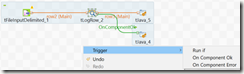
· Trigger
clip_image001tPostgressqlConnection· Trigger
· Row.Mainclip_image002tMap
map input to output columns
derive columns
perform transformations


· Row.Main
· Row.Mainclip_image003tLogRow
used as data viewer and debugging
print input data in the Run window

· Row.Main
· Trigger
· Row.Mainclip_image004tPostgresqlOutput
used to insert input data into the database
· Row.Main
· Trigger
· Row.Iterate
· Trigger
clip_image005tFileList
This outputs an iterative list of files read from a location.
The input can be from a trigger or from another row.iterate.

· Row.Main
· Trigger
· Row.Iterate
· Trigger
clip_image006tFileInputDelimited
reads data into the job so that the field attributes / schema can be further transformed
· Row.Main
· Row.Iterate
· Trigger

· Row.Iterate
· Trigger
clip_image007tFileInputJSON
reads data from a location.
presents this data / schema to the job for further transformations.

· Row.Main
· Row.Iterate
· Trigger

· Row.Mainclip_image008tFileOutputDelimited
used to write data to a file in a specified location
· Row.Main
· Trigger
· Row.Iterate
· Row.Main
· Trigger

clip_image009tJava
used to run arbitrary java code, to help with bespoke transformations.
can be used to set values to context variables, or to print messages back to the run window to help debugging the job.

· Row.Main
· Row.Iterate
· Trigger

· Row.Iterate
· Row.Main
clip_image010tExtractJSONField
used to split key:value pair data from a field / string
· Row.Main
· Row.Iterate
· Trigger

· Row.Iterateclip_image011tIterateToFlow
converts row.iterate to a row.main
· Row.Main
· Trigger
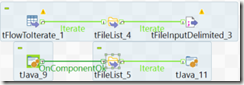
· Row.Mainclip_image012tFlowToIterate
converts row.main to a row.iterate
· Row.Iterate
· Trigger
· Row.Iterate
· Trigger
clip_image013tS3Connection
creates a connection to AWS S3
· Trigger
· Row.Iterate
· Trigger
clip_image014tS3List
used to list the objects in S3 bucket
outputs this list for iteration

· Row.Iterate
· Trigger
· Row.Iterate
· Trigger
clip_image015tS3Get
used to download the objects from s3 to a location
· Trigger
· Row.Iterate
· Trigger
clip_image016tHashOutput
used to load row.main data flow into local cache
· Row.Iterate
· Row.Main
· Trigger

· Row.Mainclip_image017tHashInput
used to retrieve data from local cache for further transformation within the job
· Row.Main
· Trigger

AWS Redshift notes

SQL Clients


Script resources

Wednesday, 28 August 2019

Talend TOS TMap Join configuration – Match Model

https://www.talendbyexample.com/talend-tmap-component-joins.html


Image 5

This short article contains text-snippets from the link above.

It explains the important considerations when joining data together using tMap component, in Talend Open Studio.


Lookup Model
Normally, you would choose to load your look-up input only once. This is the default Lookup Model of Load Once.
If you have a use-case where you need to reload the look-up input for each of your primary rows, then you have the option of Reload at each row or Reload at each row (cache). Depending on the size of your inputs, either of these latter two options are likely to severely impact the throughput of your Job.

Match Model
The default Match Model is the curiously named Unique match.
If your primary row matches multiple rows in your look-up input, then only the last matching row will be output.
The remaining options are First match, where only the first matching row will be output, and All matches where all matching rows will be output.

Join Model
The default Join Model is Left Outer Join, that is, if no matching row appears in the look-up input, rows from the primary input will still be output.
If you need to perform an Antijoin, then select this option and exclude rows later, by outputting a key value from your look-up input and subsequently excluding rows where this value is null.

The second option available is Inner Join. In this case, only rows where a successful match has been made against the look-up, will be output.

Store temp Data
If you are processing large datasets, you may find it helpful to set this option to true, to conserve memory. When set to true, you will also need to set Temp data directory path; which may be found on the Advanced settings component tab of tMap. Note that this is likely to have a negative impact on the overall throughput of your Job.

Tuesday, 6 August 2019

How To – Talend TAC Update License Token

How To – Talend TAC Update License Token
This guide details how to get a new license token for TAC.
When a token is about to expire, the notification shown below is visible at the top of TAC.

To renew the token, follow the steps below.

1. On the initial TAC login screen, click on the Go to db config page link below the login button.


2. Enter the main user or administration password for TAC when prompted.


3. Next click on Validate your license manually to manually force a new verification.


4. A popup-window will appear.
Copy the long string/message in the top box of the popup-window.
Then click on the link which will open a new browser tab to https://www.talend.com/api/get_tis_validation_token_form.php


5. In this new browser tab, paste the long string/message into the form, and click on the Get your validation token button.


6. Copy the new validation token, and paste this into the bottom box of the previous popup-window mentioned in step (4).
Now click the Validate button.
If successful, then a message in green should state New validation token set.


7. The various configuration checks should all be green-ticks, in particular, the license check.


Now click on the Go to login page to return back to the initial TAC login screen and login as normal.
The notification License token will expire should not be present anymore.
If it is, give the server 5 minutes, and log back in again.
8. As a final check, the license expiry date can be confirmed via the Licenses menu.


Friday, 7 June 2019

Postgres Update and Delete statements involving a join

The high-level pg-sql commands below show the syntax for updating or deleting from a postgres table.


--POSTGRES
--DML
--UPDATE
update tbl_target m
set sales = d.sales
,   status= d.status
from tbl_source d
where m.id = d.id;

--DELETE
delete from tbl_target a
using tbl_source b
where a.id = b.id;


The SQL SERVER equivalent is:

--SQL SERVER
--DML
--UPDATE

update tbl_target
set sales = b.sales
, status = b.status
from tbl_source b
where tbl_target.id = b.id;

delete tbl_target
from tbl_source b
where b.id = tbl_target.id;


Below – the setup scripts for the tables (works for both postgres and sql server)

create table tbl_target (id int, sales int, status varchar(10));
insert into tbl_target values
(1,10,'red'),
(2,20,'yellow'),
(3,30,'green');

create table tbl_source (id int, sales int, status varchar(10));
insert into tbl_source values
(3,35,'dark-green');

select * from tbl_target;
select * from tbl_source;
/*
drop table tbl_target;
drop table tbl_source;
*/

Monday, 29 April 2019

AWS Secrets Manager python script

"Introduction to AWS Secrets Manager"
https://www.aws.training/learningobject/video?id=19441
The link above is to a 15 minute introductory video that covers the "AWS Secrets Manager" service.
The summary from this training and certification page is:
"In this course, we offer a brief overview of AWS Secrets Manager, highlighting the integration with Amazon Relational Database Service. The video discusses how this service can help manage secrets like OAuth tokens and application API keys, and concludes with a demonstration of how AWS Secrets Manager can generate and automatically rotate your secrets and passwords."
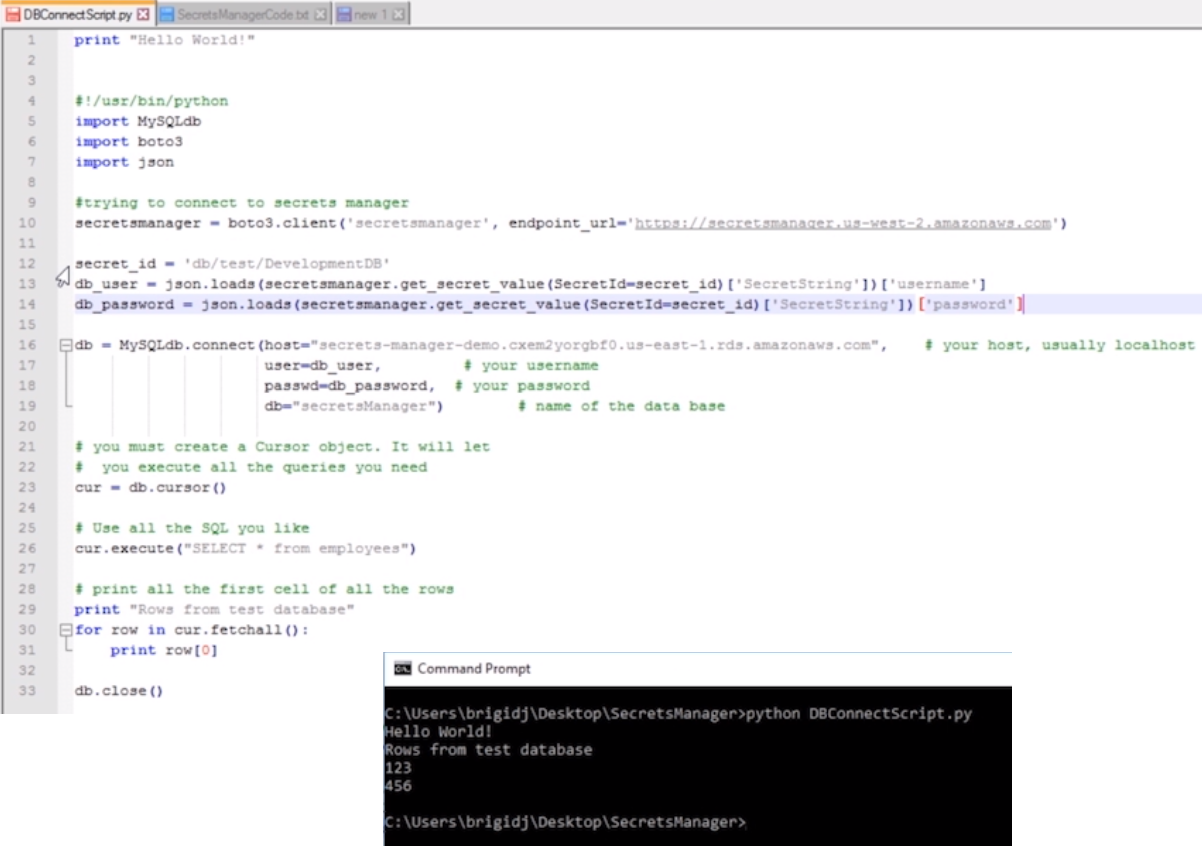
A similar python script that Bridgid used in her training and certification video is:
print "secrets manager test"
#!/usr/bin/python
import MySQLdb
import boto3
import json
#trying to connect to secrets manager
secretmanager = boto3.client('secretsmanager', endpoint_url='https://secretmanager.us-west-2.amazonaws.com')/
secret_id = 'db/test/DevelopmentDB' #this is the secret name within aws-SecretManager
db_user = json.loads(secretmanager.get_secret_value(SecretId=secret_id)['SecretString'])['username']
db_password = json.loads(secretmanager.get_secret_value(SecretId=secret_id)['SecretString'])['password']
db = MySQLdb.connect(host='secrets-manager--demo.abc123.us-east-1.rds.amazonaws.com', #db endpoint
            user=db_user, #db username
            passwd=db_password, #db username password
            db="secretManager") #db name
# you must create a cursor object, it will let you execute all the queries needed
cur = db.cursor()
cur.execute("select * from employee")
# print all the first cell of all the rows
print "Rows from the test database"
for row in cur.fetchall():
    print row[0]  # index 0 equates to the first field in the record
db.close()


There’s many youtube video’s covering AWS Secrets Manager:
https://www.youtube.com/user/AmazonWebServices/search?query=secrets+manager

Thursday, 4 April 2019

Talend Admin Center TAC login

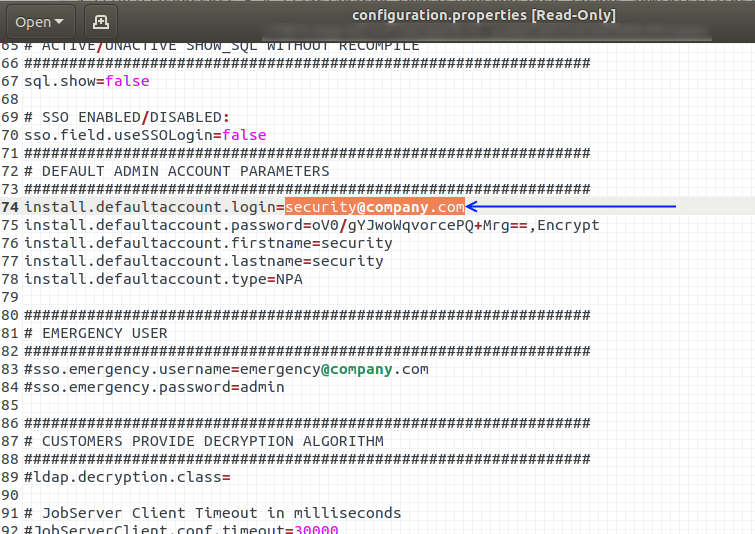
Below is the location of the configuration.properties file.
Viewing this file is very handy when locked out of the TAC gui.
The default login for TAC (after a fresh install) is
username: security@company.com
password: admin
To confirm what the default login is, it’s best to refer to the configuration.properties file on the TAC server, as detailed below.
On a local vbox installation, the Talend installation was in the local home directory.
Via a terminal session, the commands to navigate to this directory, and view the file is:
(your installation may be in a different directory, but the path should be similar.
Talend may be a different value dependant on your installation
tac may be a different value dependant on your installation)
cd ~/Talend/tac/apache-tomcat/webapps/tac/WEB-INF/classes
vi configuration.properties

Wednesday, 3 April 2019

REST API–A to Z

This article contains a summary of notes related to what REST API’s are.

(Care of https://www.smashingmagazine.com/2018/01/understanding-using-rest-api/)

REST API : REpresentational State Transfer Application Programming Interface.

A request to a URL which is the REST API endpoint results in a response containing data which is called the resource.


Anatomy

  1. The endpoint (or route)
    1. this is the url, which is made up of a root-endpoint, and path and finally the query
    2. for example “http://faihofu.blogspot.com/search/label/aws
      www.faihofu.blogspot.com” is the root-endpoint
      ”/search/label/aws” is the path
    3. another example “https://www.google.co.uk/search?q=faihofu
      www.google.co.uk” is the root-endpoint
      ”/search” is the path
      ”q=faihofu” is the query
  2. The method
  3. the headers
  4. The data (or body or message)

1 Endpoints

When referring to API documentation, the path me be stated as
“/search/label/:labelvalue”
Any colons within the path denote a variable, which need to be replaced when hitting the endpoint.

2 Method

These are the types of API requests:

  1. Get
    1. This is the default method to request / read from the endpoint / server
  2. Post
    1. This creates a new resource / data on the endpoint server
  3. Put
    1. This updates the resource / data on the endpoint server
  4. Patch
    1. see PUT
  5. Delete
    1. This deletes resource / data on the endpoint server

These methods are used to perform one of the actions (CRUD):

  • Create
  • Read
  • Update
  • Delete

3 Headers

“Headers are used to provide information to both the client and server.
You can find a list of valid headers on MDN’s HTTP Headers Reference.”

HTTP Headers are property-value pairs that are separated by a colon.
The example below shows a header that tells the server to expect JSON content.
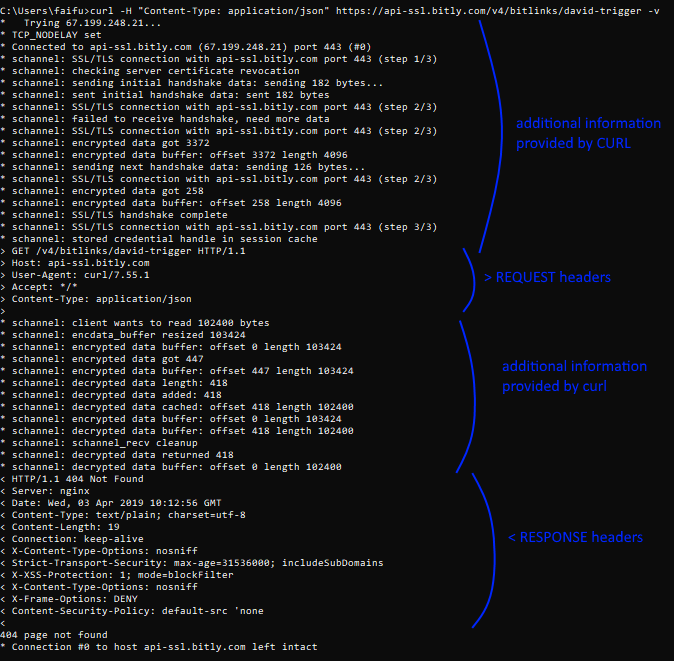
You can send HTTP headers with curl through the -H or --header option.
To view headers you’ve sent, you can use the -v or --verbose option as you send the request, like this:

curl -H "Content-Type: application/json" https://api.github.com -v


4 Data, Body, Message

The data (sometimes called “body” or “message”) contains information you want to be sent to the server.
This option is only used with POST, PUT, PATCH or DELETE requests.
To send data through cURL, you can use the -d or --data option:

curl -X POST <URL> -d property1=value1 -d property2=value2


Authentication

To perform a basic authentication with cURL, you can use the -u option, followed by your username and password, like this:

curl -x POST -u "username:password" https://api.github.com/user/repos


HTTP Status codes and error messages

When a CURL command returns an error (use --verbose to view full details), the error code can be translated using the HTTP status reference:
MDN’s HTTP Status Reference.


CURL (cURL) https://curl.haxx.se/

CURL is a command line tool and library used to transfer data, and in this blog-context, can be used to access / hit API endpoints.

To test if curl is installed, run the following command:

curl –version


Using query parameters

When accessing an endpoint using query parameters, the “?” and “=” need to be escaped in the url.

For example

curl https://api.something.com/somepath\?query\=queryvalue


JSON

API responses are often returned in JSON format.

JSON = JavaScript Object Notation

JSON documents can contain non-structured data, in the form of key-value pairs.

{
  "property1": "value1",
  "property2": "value2",
  "property3": "value3"
}

Example curl commands

curl -u "username:password" https://api.github.com/user/repos -d "{\"name\":\"testrepo12345\"}"

curl -u "username:password" https://api.github.com/repos/{username}}/testrepo12345 DELETE 

curl -u "username:password" https://api.github.com/user/repos

Thursday, 28 March 2019

How AWS Lambda works

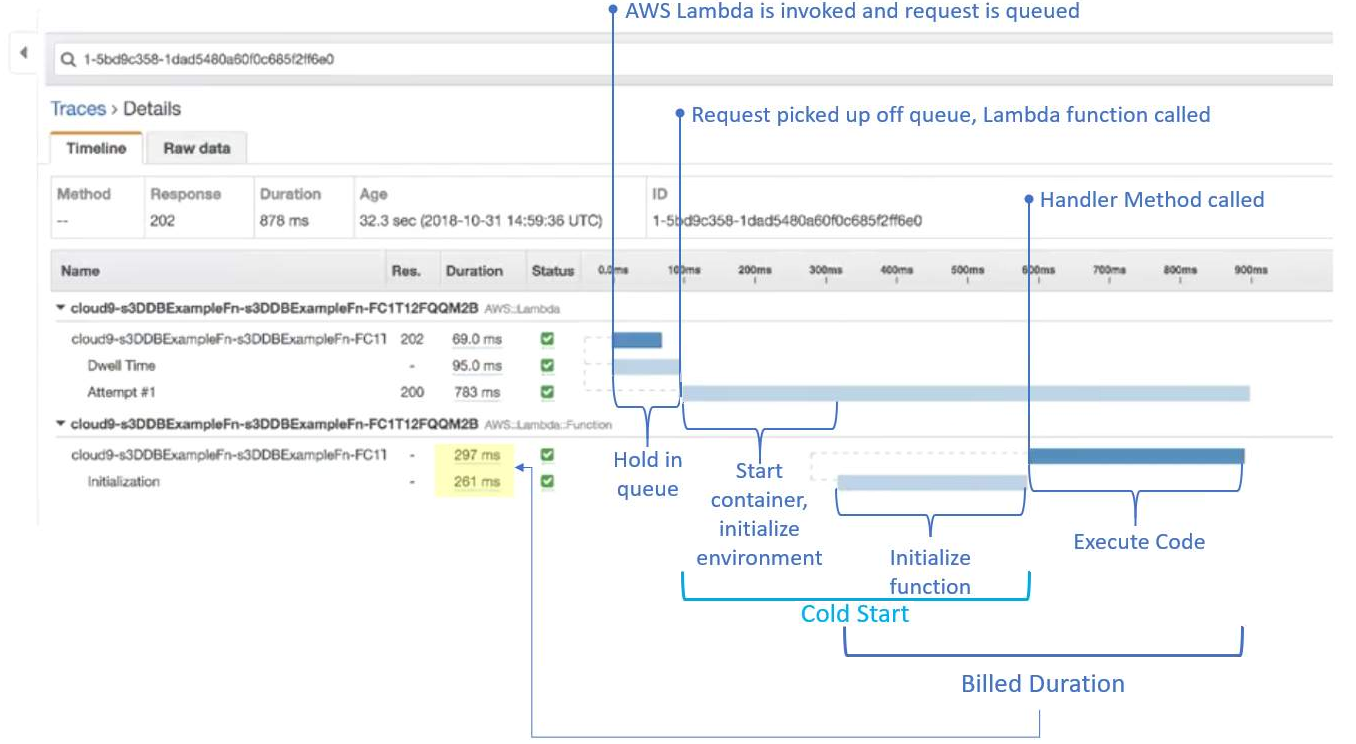
Below is a diagram (taken from AWS.training) that’s the result of a Lambda cold start, using AWS X-Ray.

In this example, an object is added to an S3 bucket, which asynchronously triggers the Lambda function invocation.

  • Asynchronous push events are queued


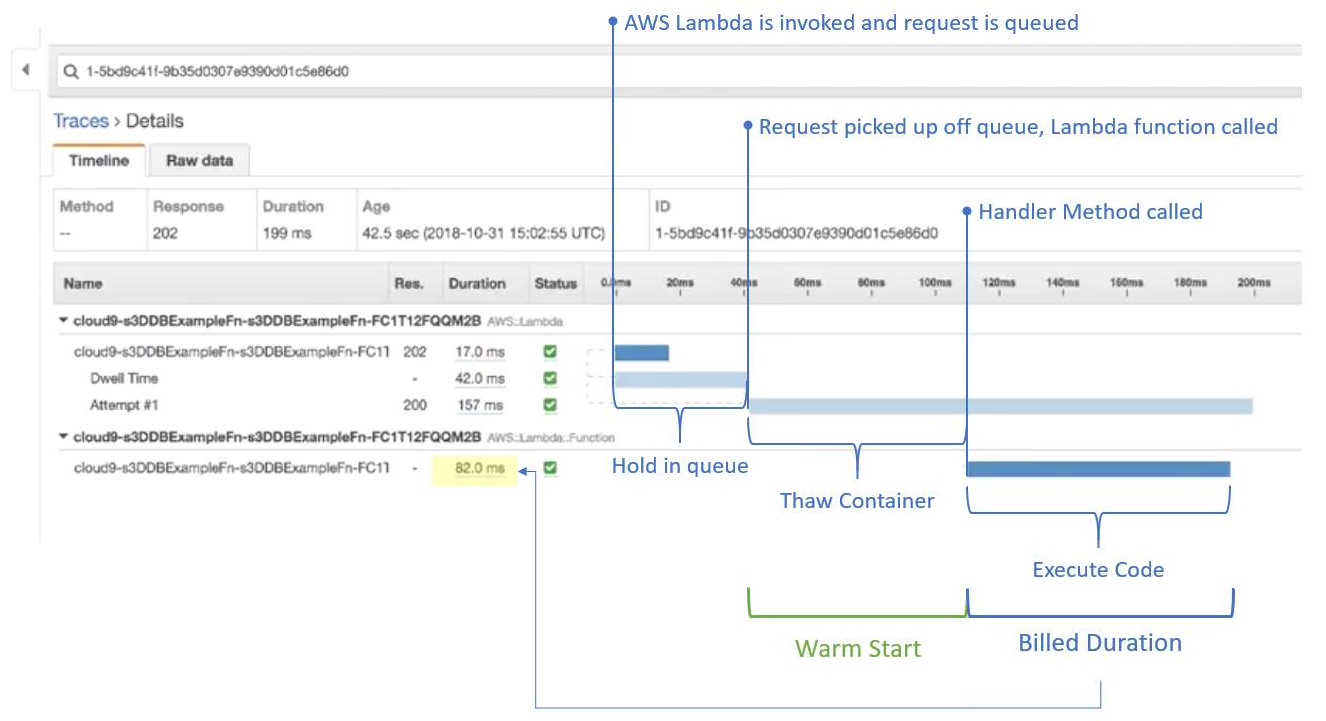
The diagram below is for a Lambda warm start.
Note the shorter duration.
Cold start: 878ms
Warm start: 199ms

The important fact is the lower billed duration of the warm start.
Cold start: 558ms (297 + 261)
Warm start: 82ms

Wednesday, 27 March 2019

Talend TAC Job Conductor Trigger details from database

Below is a simple query to retrieve “Job Conductor – Task – Trigger” details from the database tables associated to Talend Admin Center (TAC).

select
  et.id as executiontask_id
--,et.dtype
,et."label" as task_name
,et.idquartzjob
,t.trigger_name
,t.job_group
,tt.dtype
,tt."label" as trigger_label
,tt.description as trigger_desc
,tt.active as trigger_active
,to_timestamp(t.next_fire_time/1000) as next_fire_time
,to_timestamp(t.prev_fire_time/1000) as prev_fire_time
,to_timestamp(t.start_time/1000) as start_time
,t.start_time / 1000 as start_time_seconds
,t.start_time as start_time_unix_milliseconds
,t.trigger_state
,ct.cron_expression
,tt.listminutes
,tt.listhours
,tt.listdaysofweek
,tt.listdaysofmonth
,tt.listyears
,et.jobid
,et.idremotejob
,et.jobname
,et.generatedprojectname
,et.generatedjobname
,et.generatedjobversion
,et.generatedsvnrevision
,et.artifactgroupid
,et.artifactid
,et.runasuser
,et.status
,et.errorstatus
,et.jobversion
,et.context
,et.branch
,et.active
,et.lastscriptgenerationdate
,et.lastdeploymentdate
,et.lastrundate
,et.lastendedrundate
,et.lasttriggeringdate
,et.jobscriptarchivefilename
from executiontask et
left join qrtz_triggers t on t.job_name = et.idquartzjob::varchar
left join qrtz_cron_triggers ct on ct.trigger_name = t.trigger_name
left join talendtrigger tt on ct.trigger_name = tt.idquartztrigger::varchar
;


NOTE

Within the qrtz_cron_triggers table, the cron expression could look similar to

0 1,2,3 4,5,6 ? 4 2,3,4,5,6 2020

Note that there’s a space to help separate the difference parts of the cron expression

seconds:0 –this is always zero as the cron-scheduler within TALEND doesn’t have the functionality to set to the second.

minutes:1,2,3
hours:4,5,6
days of month:? –this means it’ll run for every day in the month
month:4 –April = 4th month in the year
days of week (1 = Sunday):2,3,4,5,6 –this is for Monday, Tuesday, Wednesday, Thursday,  Friday
year:2020


EXECUTION PLAN

When Job Tasks are set up as a sequence, or have inter-relationships (parent child), or setup as some form of hierarchy within the EXECUTION PLAN CONSOLE, then these details can be viewed using the following query:

select
  etp."label"  as parent_task_name
,et."label" as child_task_name
,case when e.executionplanpart_parent_id is null then 'Header' else '' end as Header
,e.id as executionplan_id
,e.executionplanpart_parent_id
,e.executionplan_executionplan_id
,e.executiontask_task_id
,e.status
,e.startdate
,e.enddate
--,e.*
--,et.*
FROM public.executionplanpart e
left join executiontask et on et.id = e.executiontask_task_id
left join executiontask etp on etp.id = e.executionplan_executionplan_id
order by e.executionplan_executionplan_id , e.id
;

Wednesday, 20 March 2019

Talend Job Statistics error, Connection refused, connecting to socket

https://community.talend.com/t5/Administering-and-Monitoring/resolved-Sockets-range-to-get-statistics/td-p/99764

When executing a Talend job via TAC (Talend Administration Center / the Talend Server), the following error message can be returned if the JobServer / Execution service is a remote server.
ie The JobServer or Execution service isn't on the same server as TAC.

[statistics] connecting to socket on port 10226
[statistics] connection refused

The statistics port 10226 is chosen at random by the server from a range of 10000 to 11000.
The connection is refused if this is blocked by a firewall (or security group in the case of AWS instances).
The details below help correct this.


Changing Statistics port settings

TOS (Talend Open Studio)

Window -> Preferences -> Talend -> Run/Debug and there you can change the stats port range.


TAC

For Talend Administration Center, edit the following file:
TOMCAT_FOLDER/webapps/org.talend.administrator/WEB-INF/classes/configuration.properties
Look for these lines (or add them onto the end of the file):
# The range where find a free port on the Administrator machine, where the job will send the statistics informations during its execution
scheduler.conf.statisticsRangePorts=10000-11000

And then change the scheduler.conf.statisticsRangePorts parameter for the desired range, like this:
scheduler.conf.statisticsRangePorts=10000-10010

The file should look something like this:

Tuesday, 19 March 2019

AWS Webinar: Testing and Deployment Best Practices for AWS Lambda-Based Applications

[This page contains the Q&A from the AWS webinar on “Testing and Deployment Best Practices for AWS Lambda-Based applications.

The details below are useful, but always use this information in combination with your own research.

Answers to the questions were provided by Eric Johnson of AWS during the webinar.

]


AWS SAM: AWS Serverless Application Model
The AWS Serverless Application Model (AWS SAM) is a model to define serverless applications. AWS SAM is natively supported by AWS CloudFormation and defines simplified syntax for expressing serverless resources. The specification currently covers APIs, Lambda functions and Amazon DynamoDB tables.
https://docs.aws.amazon.com/lambda/latest/dg/serverless_app.html


Q: What is your recommendation on creating and maintaining connection pools to RDS / POSTGRES databases that are needed in a Lamba Function?
A: If you are using Aurora Serverless look at the Data API. https://docs.aws.amazon.com/AmazonRDS/latest/AuroraUserGuide/data-api.html


Q: Can you use Cloud9 to debug SAM local?
A: Yes, however, C9 also offers a UI for debugging, that is based on SAM local - either work.


Q: I don't really understand the context object of a lambda function. What is it used for?
A: This object provides methods and properties that provide information about the invocation, function, and execution environment.
https://docs.aws.amazon.com/lambda/latest/dg/nodejs-prog-model-context.html


Q: How does debugging work with SAM?
A: You can set breakpoints and have a call stack available. It connects to the debug port provided by SAM Local. https://docs.aws.amazon.com/serverless-application-model/latest/developerguide/serverless-sam-cli-using-debugging.html


Q: Is there any way to autogenerate sam template? or need to write it yourself?
A: Using "SAM init" on the SAM cli will create a base template for a project.


Q: How to do canary, an blue/green with serverless?
A: https://aws.amazon.com/blogs/compute/implementing-canary-deployments-of-aws-lambda-functions-with-alias-traffic-shifting/ You can do traffic shifting between your serverless functions. Just what Chris is explaining right now.


Q: If a lambda function is contained on a VPC, being that VPC different per stage… how can we define the VPC to be used for a certain Environment? (if using tags to deploy)
A: You can specify VPC through template parameters.


Q: How to daisy-chain lambdas together?
A: Step-functions allows you to write loosely coupled lambda functions together instead of creating dependency between them. More elegant and less glue code required;


Q: If running a serverless .net core app on a lambda function which exposes numerous endpoints does a cold start relate to the lambda function as a whole or per endpoint?
A: Cold start is specific to a Lambda function and not individual endpoints supported by the same Lambda function. For example: if one endpoint starts the Lambda execution environment, another call to an endpoint on the same lambda function will be warm and ready to go.


Q: Is there anyway to use OpenAPI to generate SAM template?
A: API Gateway resources can use OpenAPI documents to define the endpoints. You can also export your API Gateway to an OpenAPI doc from within the console.


Q: What is the best way to trigger N number of lambda functions at once? Should SQS be used?
A: Lambda functions can be triggered from SQS but it is not guaranteed they will be triggered at the same time. You can also broadcast to multiple Lambda functions via SNS.


Q: Is serverless a good idea to sue for a project where my users start using the app everyday between 8;30 to 9 A.m and shuts down at 5:30 pm?
A: As far as timing, Serverless would work well for this because you will only be charged for the invocations. There will be no resources sitting idle.


Q: is sam also a sub component of the aws cli or will it be?
A: SAM is not a sub-component of the AWS CLI, but DOES depend upon it. For example, SAM package is a wrapper for aws lambda package.


Q: will there be delay to execute the Lamda when user first start using in the morning? considering the cold start ?
A: The first time a Lambda function is invoked there will be a slight cold start delay. The length of this delay is dependant on multiple factors like memory, function size, language, and if it is in a VPC. Outside of a VPC the cold start is often in the milliseconds


Q: Do lambda layers work locally in node js? I've updated aws-cli, sam local, and pip, but this doesn't seem to work locally
A: Yes it does work. You do need the latest version of AWS CI and SAM. Updating AWS CLI requires the latest Python as well for the latest features. If you are on a MAC I have found that using Brew is the best way to install.


Q: Is the AWS SAM CLI suitable for use in automation?
A: Depends on the automation, but I would generally say it is best for development. Automation should be achieved through tools like CodePipeline, CodeBuild, CodeDeploy, etc


Q: Are there some example projects using AWS SAM?
A: The Serverless Application Repository has many examples to look at. https://aws.amazon.com/serverless/serverlessrepo/


Q: Where do the various environment configs live, in their own template files?
A: Configs can live several places. Parameter Store, Build Variables, Template Variables. If using a different account for environments I encourage the use of the parameter store


Q: It seems like when I use layers in sam templates. I need to push from a sam template first to create a new version of the layer. Then manually change the version number in the template to reference the new layer version. Is there a way to reference code that you are zipping up and sending to s3 to become a layer version in the lambda template. Then referencing that same template for zipping into s3 for your layer link?
A: For iterating purposes, if the layer is on the same template you can reference the logical name of the layer. It will grab the latest each time
Monday, 11 March 2019

AWS training links

Below are a short list of links to AWS training material that I’ve found extremely useful.
Comment Link
AWS Training / Learning library home page.
Free registration required.
Hundreds of modules to learn about the different AWS services.
An incredible resource which is amazingly free.
https://www.aws.training/

https://aws.amazon.com/events/awsome-day-2019/
AWS Cloud Practitioner Essentials course.
A great way to quickly learn the basics of the core services, through watching a series of structure videos with multiple choice questions at the end of each topic to enforce and consolidate your learning.
https://www.aws.training/learningobject/curriculum?id=27076
Qwiklabs.
A a great resource to learn cloud skills.  The courses provide sandbox environments to learn new skills.
There’s also free courses to learn to help learn some of the basics of the course services.
Qwiklabs covers both AWS and GCP.
https://www.qwiklabs.com/catalog?keywords=&cloud%5B%5D=AWS&format%5B%5D=any&level%5B%5D=any&duration%5B%5D=any&price%5B%5D=free&modality%5B%5D=any&language%5B%5D=any
AWS Monthly webinars.
These are a great resource to see what’s new, or gleam in depth insight into a particular service.\
These sessions change frequently as AWS services evolve, so also keep popping back to the page to see what’s new.
https://aws.amazon.com/about-aws/events/monthlywebinarseries/

ARCHIVE
https://aws.amazon.com/about-aws/events/monthlywebinarseries/archive/


AWS Documentation.
The trusty default go to when you need to reference something within AWS.
https://docs.aws.amazon.com/index.html#lang/en_us
AWS Youtube channelhttps://www.youtube.com/user/AmazonWebServices


AWS FREE TIER - when creating a new account -- does the free-tier time/window start as soon as the account is created, or as soon as a particular service is started?

The 12 Months starts from the account creation

https://aws.amazon.com/free/?all-free-tier.sort-by=item.additionalFields.SortRank&all-free-tier.sort-order=asc

Please see the FAQ - https://aws.amazon.com/free/free-tier-faqs/

As well as a link to an article discussing tracking free tier usage.

You are also able to leverage Cloudwatch and creating billing alarms

https://docs.aws.amazon.com/awsaccountbilling/latest/aboutv2/tracking-free-tier-usage.html


Thursday, 7 March 2019

[NOTES] Building a Highly Efficient Analytics Team

/*

Notes from the PragmaticWorks webinar
https://pragmaticworks.com/Training/Details/Building-a-Highly-Efficient-Analytics-Team

*/

How to build a better analytics team

Analytics teams help differentiate difference businesses.

How businesses use their data to

  • optimise business process
    • understand what is a “normal benchmark”
    • highlight opportunities to improve (based on existing benchmarks)
  • highlight new opportunities that wasn’t obvious previously (can’t see the wood for the trees)


How do we define “world class”?

  • Attitude
    know that there’s always room to learn
  • Aptitude
    grow your skillset to deliver measurable benefit
  • Adaptability
  • Acceleration


How to assess your current team?

  • Build a team based on potential, not on current-skill set


Getting from today to world-class

  • rate your team on the “4 A’s”
  • Clean up low hanging fruit
  • Hand off “chores”
  • Create capacity for improvement
  • Set aggressive 90-day goals
  • Get creative with team activities (hack-a-thons etc)
  • Create specific plans and targets
  • Put your plan into action and socialize results!


Gaining the Necessary Skills

  • What skills are needed?
    • Data Cleansing
    • Data Modelling
    • Data Analysis eXpression
    • Data Visualization Best Practice
      Good story telling, guiding the user through the main themes/conclusions that the data presents
    • Power BI Administration
    • Data Governance
  • How do you gain these skills?
    • Free webinars
    • Blogs
    • Books
    • YouTube
    • On-Site Training
    • Web-based On-Demand Learning
      Pluralsight, Udemy
  • Pushing your team
    • Set goals
      • By the end of the month, you should know how to…
      • By the end of the Quarter, you should know how to implement …
    • Find out what motivates the team
      • Competition between co-workers
      • Buy lunch for your team when they reach a goal
    • Define Learning Paths
      • What things you want your team to know, and in what order
  • Other considerations
    • Specialist vs Jack-of-all-Trades
    • Find ways to jump start your teams experience early (Hack-a-thons)
    • Value of Certifications
      Be prepared why certifications are valuable, and what was learnt, and how that matters

Wednesday, 16 January 2019

Talend Open Studio – Configure Statistics and Log Capture

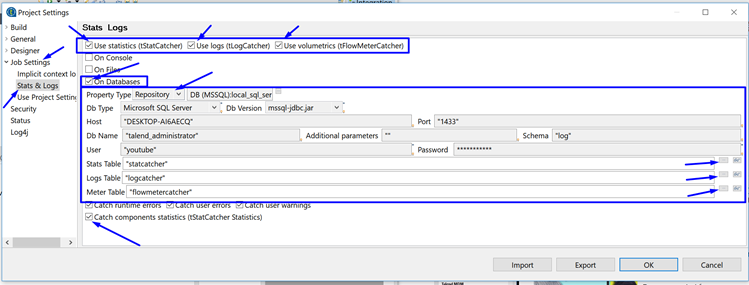
Within TOS (Talend Open Studio) – the project settings can be configured to allow component-level statistics and log capture.
This information can be directed to database tables for later review.
The tables are

    StatCatcher
    LogCatcher
    FlowMeterCatcher

These tables can be created by watching: https://www.youtube.com/watch?v=31EY-VhjjoA


Or by following http://diethardsteiner.blogspot.com/2012/02/talend-setting-up-database-logging-for.html

Below are the steps to configure a TOS project so that the components log stats during execution.
(it’s fairly intuitive)


Project Properties

1) Open a project, and click File>Edit Project properties


Project Settings


2) In the project settings window, navigate to Job Settings>Stats & Logs
3) Tick the boxes in the upper right for
    Use statistics (tStatCatcher)
    Use logs (tLogCatcher)
    Use volumetrics (tFlowMeterCatcher)
4) Tick the box for On Databases and enter the db connection details (or use the settings already stored in the project repository)
5) Finally click on the ellipse’s to help choose the correct logging table within the database.
6) Optionally, also tick the Catch components statistics (tStatCatcher Statistics).

Monday, 26 November 2018

Skoda Fabia (mk1) Fuse Layout

image

Power consumer

A

1

Instrument cluster, ESP

5

2

Brake lights

10

3

Power supply for the diagnostics, air-conditioning system

5

4

Interior lighting

10

5

Not assigned

-

6

Lights and Visibility

5

7

Engine electronics, power-assisted steering

5

8

Not assigned

-

9

Lambda probe

10

10

S-contacta)

5

11

Electrically adjustable rear mirrorb)

5

12

Ventilation system, air-conditioning system, Xenon headlight

5

13

Reversing light

10

14

Diesel engine control unit

10

15

Headlight cleaning system, window wiper

10

16

Instrument cluster

5

17

Petrol engine - control unitc)

5

18

Phone

5

19

Automatic gearbox

10

20

Control unit for lamp failure

5

21

Heated windscreen washer nozzles

5

22

Not assigned

-

23

Right main beam

10

24

Engine electronics

10

25

Control unit for ABS, TCS control unit for ESP

5 10

26

Not assigned

-

27

Not assigned

-

28

Cruise control, switch for the brake and clutch pedal

5

29

Not assigned

-

30

Main beam on the left and indicator light

10

31

Central locking system - door lock for the boot lid

10

32

Rear window wiper

10

33

Parking light on the right

5

34

Parking light on the left

5

35

Injector - petrol engine

10

36

Licence plate light

5

37

Rear fog light and indicator light

5

38

Heating of the external mirror

5

39

Rear window heater

20

40

Horn

20

41

Front window wiper

20

42

Cigarette lighter, power socket

15

43

Central control unit, selector lever lock for the automatic gearbox

20

44

Turn signals

15

45

Radio, navigation system

20

46

Electrical power window (at the front on the right)

25

47

Not assigned

-

48

Diesel engine - control unit, injector

30

49

Central locking system

15

50

Low beam on the right

15

51

Power socket in the luggage compartment

15

52

Ignition

15

53

Electrical power window (at the rear on the right)

25

54

Low beam on the left

15

56

Control unit - petrol engine

20

57

Towing device

25

58

Electrical power window (at the front on the left)

25

59

Not assigned

-

60

Horn for the anti-theft alarm system

15

61

Fuel pump - petrol engine

15

62

Electric sliding/tilting roof

25

63

Seat heaters

15

64

Headlight cleaning system

20

65

Fog lights

15

66

Electrical power window (at the rear on the left)

25

67

Not assigned

-

68

Fresh air blower

25


Wednesday, 21 November 2018

SQL SERVER IDENTITY vs POSTGRES SERIAL

What’s the POSTGRES equivalent of SQL SERVER’s IDENTITY column property?

SQL SERVER’s IDENTITY column property is often found when creating a table, and defining a column as int datatype (or biigint), with the IDENTITY property.

Create table dbo.some_table
(
  my_primary_key int IDENTITY as primary key
, some_field varchar(10)
);

The IDENTITY property helps auto-increment the field in SQL SERVER.

More details: MS link.


In POSTGRES, we follow a 2-step strategy.

1) Create (or alter) the table, and define the datatype as SERIAL.
Create table public.some_table
(
  my_primary_key SERIAL primary key
, some_field varchar(10)
);

In the background, POSTGRES then creates a SEQUENCE that is used for this SERIAL column
public.some_table_my_primary_key_seq

2) Grant USAGE and SELECT to the users (or roles) that will insert into the table.
The owner of the table has all privileges on the table, and the sequence.
Other users do not.
Make sure the other users (or roles) have select and insert on the table
GRANT SELECT, INSERT on public.some_table to <other_users>;

To correct this, execute the psql:
GRANT USAGE, SELECT on public.some_table_my_primary_key_seq to  <other_users>;
(replace <other_users> with the users/roles as needed)


If step (2) isn’t followed,  you are presented with an error message:

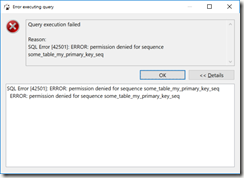
Query execution failed

Reason:
SQL Error [42501]: ERROR: permission denied for sequence some_table_my_primary_key_seq

(

in DBeaver, the error message looks like

image

)

Summary

In SQL SERVER, there’s the IDENTITY field property.

In POSTGRES, use SERIAL, and grant USAGE, and SELECT on the associated sequence.


Bonus tip

It may be easier to grant all privileges in a schema to the user.

grant all privileges on all sequences in schema public to some_user;


Script

--connect to postgres as user2
grant user2 to user1; –this is needed so that user1 can execute as user2

--reconnect to postgres as user1
select session_user, current_user, current_database();

Create table public.some_table --user1 owns this table
(
   my_primary_key SERIAL primary key
, some_field varchar(10)
);
grant select, insert on public.some_table to user2;

set role user2;
     select session_user, current_user, current_database();
     select * from public.some_table;
     insert into public.some_table (some_field) values ('hello'); --this should error
     reset role; --reset the local user to user1;
     select session_user, current_user, current_database(); --confirm that we're back as user1

grant usage, select on public.some_table_my_primary_key_seq to user2;
set role user2;
     select session_user, current_user, current_database();
     select * from public.some_table;
     insert into public.some_table (some_field) values ('hello'); --this should now pass
     reset role; --reset the local user to user1;
     select session_user, current_user, current_database(); --confirm that we're back as user1

drop table public.some_table; --can only drop the table as the owner user1

Saturday, 20 October 2018

20181020 How to remove the gear knob insert Skoda Octavia VAG

Another How To.


The chrome insert on the gear knob has started to flake - the video shows how to remove the insert so that it can be replaced or fixed.